Tag Archives: Shopping Button

Chrome Add-on: BookmarkMatic for Shoppers Version 5.0.2013.1207 Released

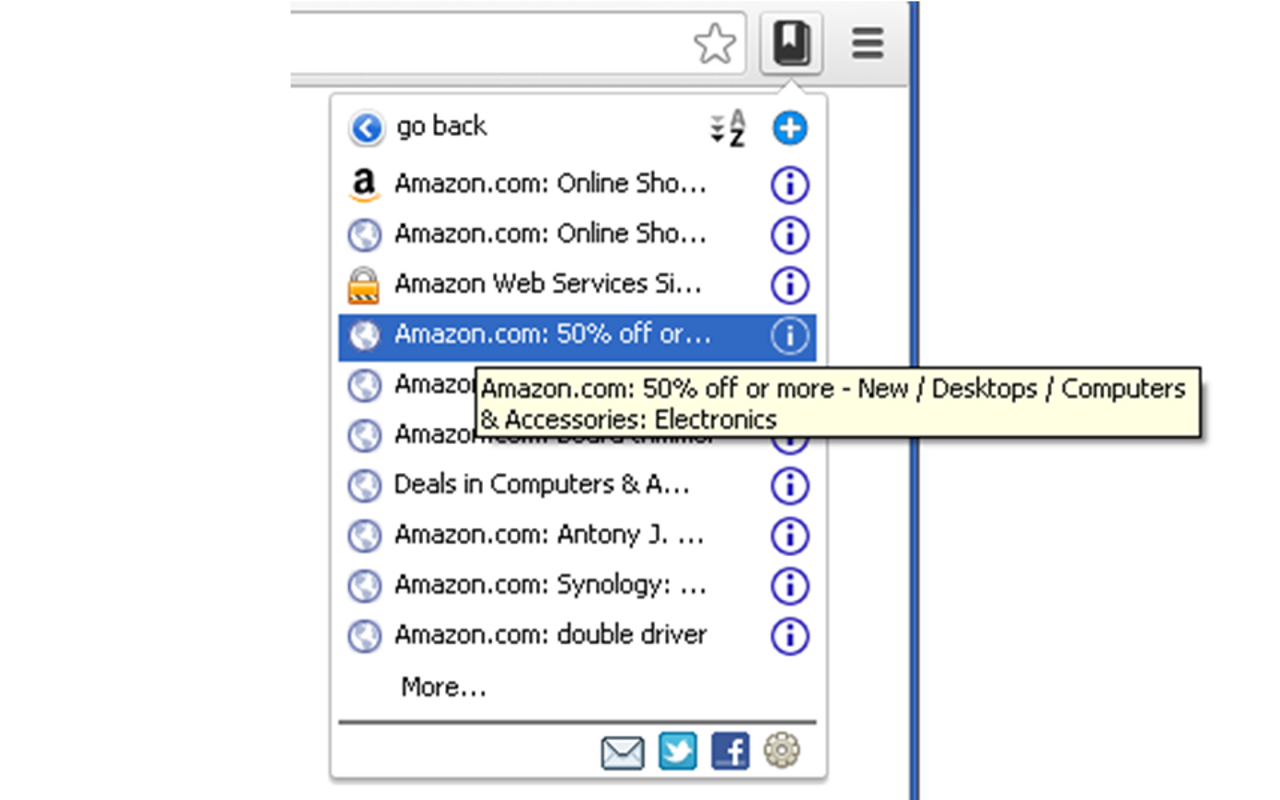
BookmarkMatic for Shoppers (BMfS) extension was created with one mission in mind: to save online shoppers’ effort and time spent on saving and organizing favorite shopping links as bookmarks.  So far BMfS was able to automatically sorts and categorizes shopping sites from browsing history, but that’s not enough.   We understand that shoppers needs capability to drill down into any shopping site and be able sort the links by visit frequency or visit time, we just released this feature in the version 5.0.2013.1207.

site drill down menu of Amazon.com

Please stay tuned for upcoming versions.

This is a new version release note of  BookmarkMatic for Shoppers, the extension is available for download now.

For a complete user manual of this add-on, please visit here.

Chrome Add-on: BookmarkMatic for Shoppers (aka Shopping Button) Version 3.3.2013.1123 Released

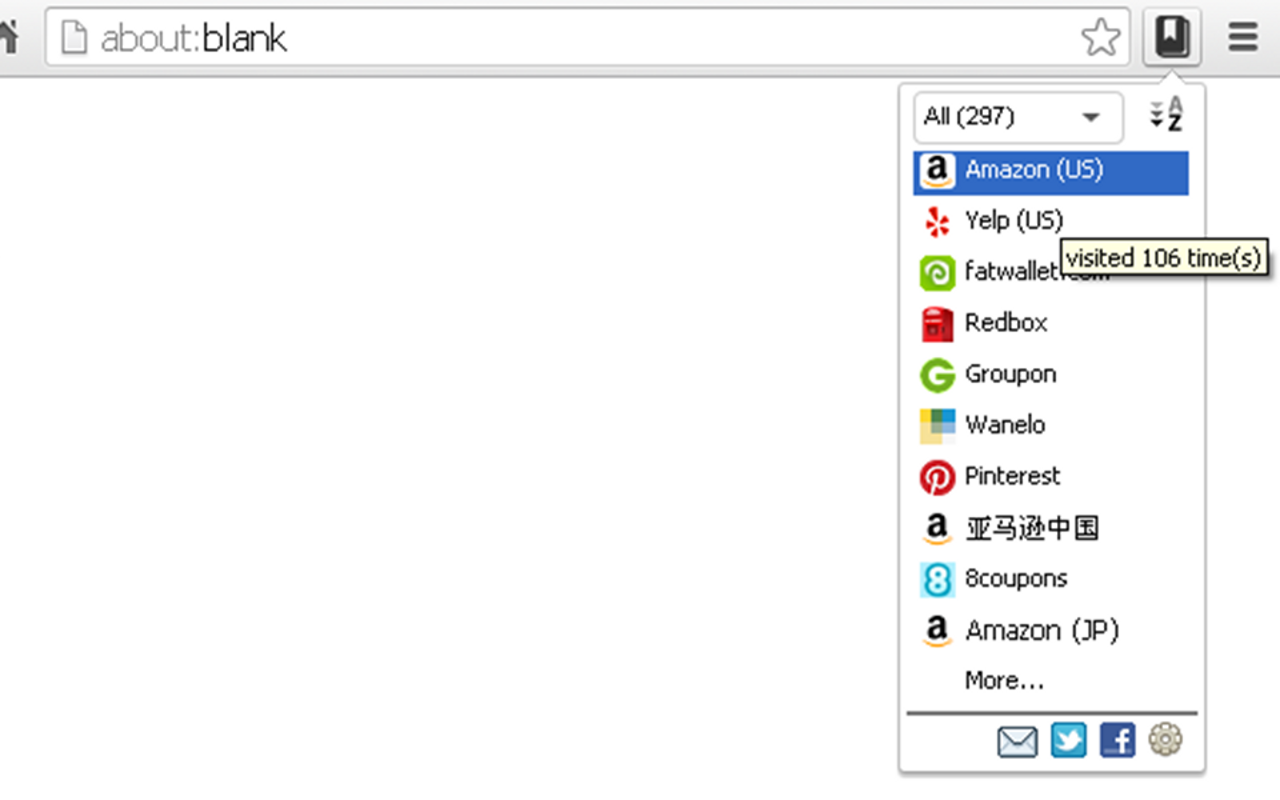
Here comes another release packed with exciting changes: new name, new logo and exciting new features added to site menu.  Starting from this version, this tool has adopted a new name: BookmarkMatic for Shoppers.  As the key value of this tool is to automatically create bookmark for shoppers, we feel BookmarkMatic for Shoppers name reflects that feature in a more direct and easy-to-understand way than the previous name.  Hopefully it’s not too difficult to pronounce for you.  We are also adopting a beautiful black bookmark icon, thank you VisualPharm for the great design.

new look of the app
new look of the app

New features

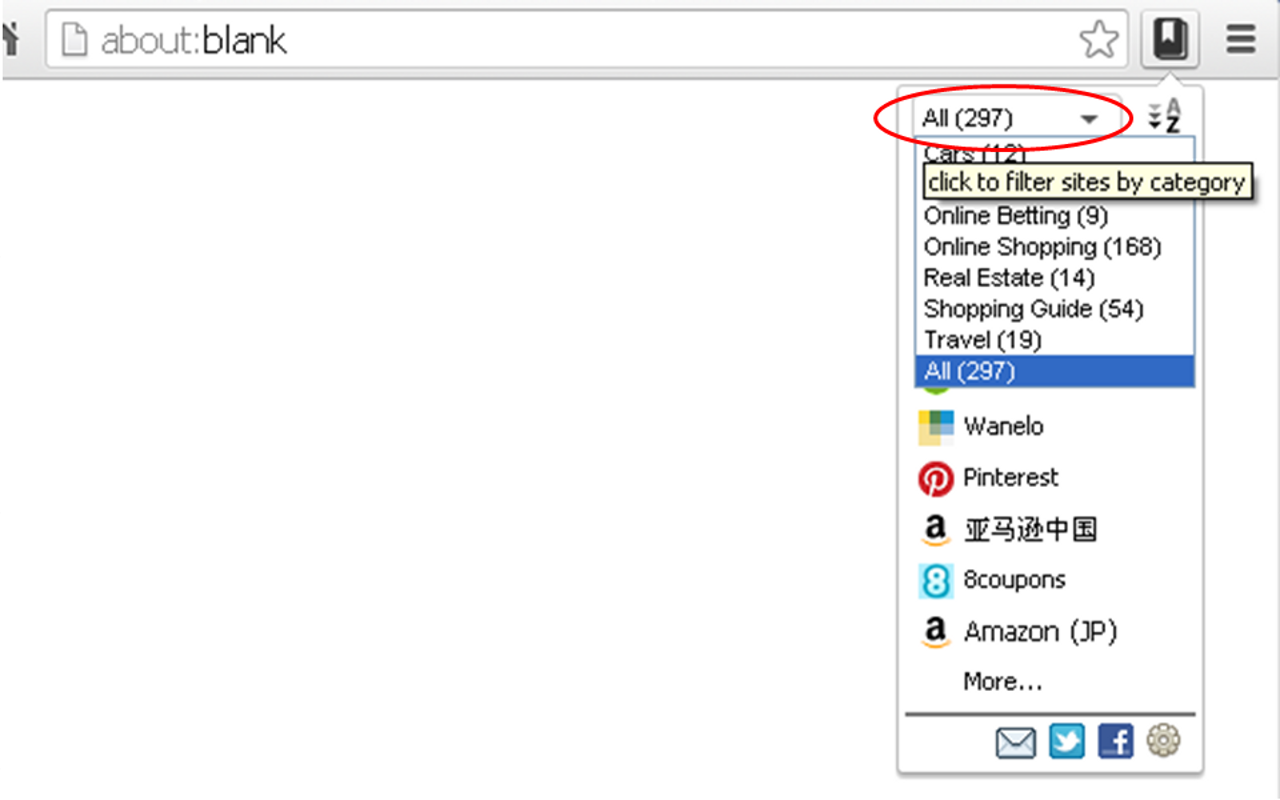
Automatically categorized shopping sites.  Manually created browser bookmarks are usually organized and categorized.   In this version, BookmarkMatic is making the first step of categorizing sites automatically.  All shopping sites you visited can be either viewed in 1 list or filtered from 1 of 7 pre-set major categories: Online Shopping, Local Shopping, Shopping Guide, Travel, Online Betting, Real Estate and Cars.

filter sites by shopping categories

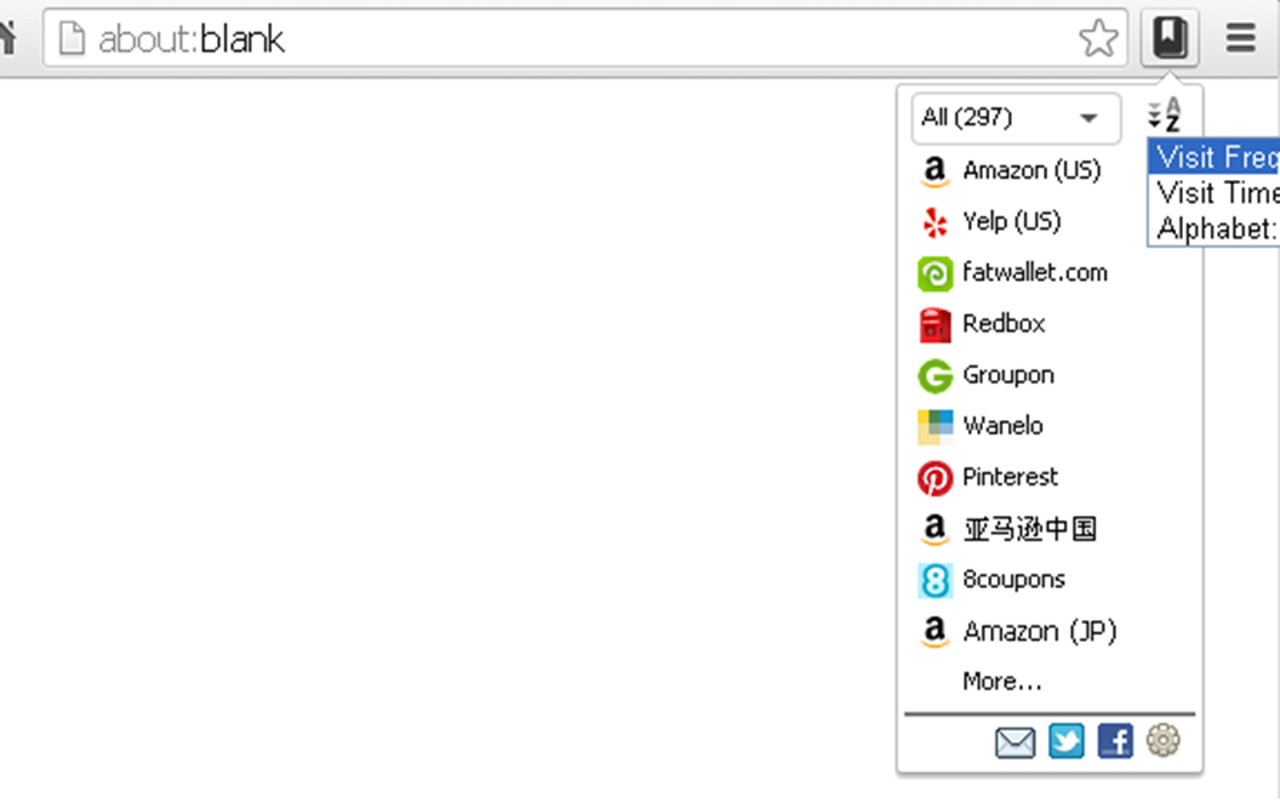
Sort sites in 1 of 3 ways.  How links are sorted is important in manually created bookmarks since it determines how convenient each link can be accessed.  In this version, BookmarkMatic introduces 3 sorting orders to automatically sort any list of sites: Visit Frequency, Visit Time or Site Names (alphabetic A-Z).

sites sorted by visit frequency, visit time or alphabet
sort sites by visit frequency, time or alphabet

Please stay tuned for upcoming versions.

This is a new version release note of  BookmarkMatic for Shoppers, the extension is available for download now.

For a complete user manual of this add-on, please visit here.

Chrome Add-on: Shopping Button Version 3.2.2013.1030 Released

7% of top Alexa 10,000 sites supported.  This version has expanded site coverage from 400+ to 1000+, not only the number of sites more than doubled, but the quality of sites got improved significantly as all newly added sites are top-tier sites in the Alexa top 10,000 club.  In addition, geographical coverage expanded from 7 countries to 43 countries worldwide.  From shopping needs perspective, this upgrade also represent an expansion: now the 1000+ sites cover end-to-end shopping needs including online shopping, offline shopping, shopping guide, automobile, real estate, travel, and even betting and gambling.

We realize that this is still an experimental stage product, we are working hard to add cool features to this product in order to make it ready prime-time coverage, please stay tuned.

This is a new version release note of  Shopping Button, the extension is available for download now.

For a complete user manual of this add-on, please visit here.

Chrome Add-on: Shopping Button Version 3.0.2013.1006 Released

This is a new version release note of  Shopping Button, the extension is available for download now.

For a complete user manual of this add-on, please visit here.

A litter more than a month after release of Shopping Button 2.0, we are releasing version 3.0, the evolution of Shopping Button software is catching up the speed of Moore’s law.    Even though the previous version took almost 12 x the time it took to build this version, the change we are making in version 3.0 is about 12x more drastic than version 2.0, life is indeed full of dramas.

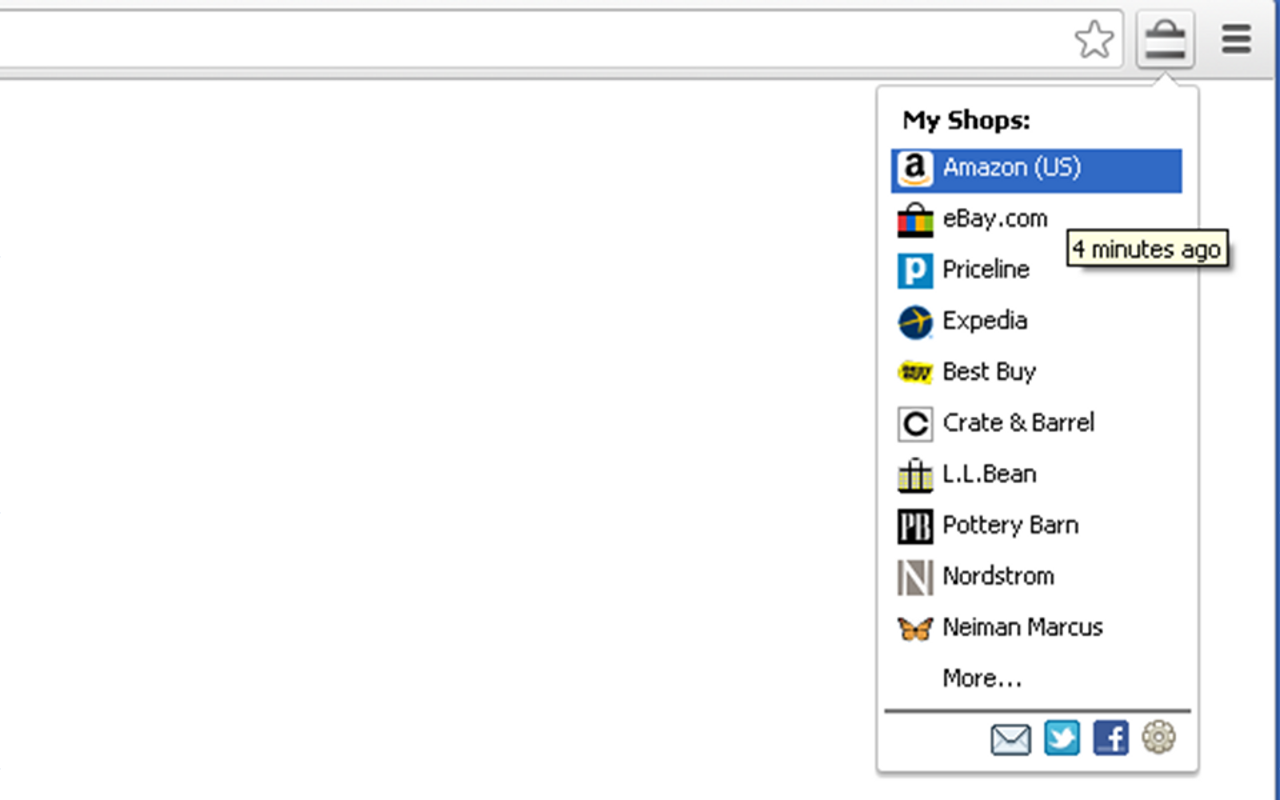
Starting from this version, this Chrome Extension will start to help you manage and organize your online shopping traces in your browser history.  Shopping Button monitors your browser history, every time when you click on its toolbar button, it pops up the most updated list of your recently visited shops, with the most recent one on the top.  With this simple tool, organizing and revisiting your recently visited shops is easier than ever.

Shopping Button currently supports ~400 and growing number of top-tier online shopping destinations in United States, China, United Kingdom, Canada, France, Germany and Belgium.  These shops also include travel booking sites and local deal providers.  We are working hard to expand the coverage and target to include top 1000 shops worldwide by end of 2013.

ss1

Disclaimers:
* This extension analyzes your browser history data to better serve your shopping needs, the processing of your browser history data is mostly done locally on your computer, in some cases when your history data will need to be processed remotely, you will have easy option to decline that offer, and we will not start transmitting your data without your explicit consent.
* This extension uses Google Analytics to collect summary-level anonymous extension usage statistics to help improve user experience. If you want to opt-out, please visit http://tools.google.com/dlpage/gaoptout
* Google Chrome® and Google® logos are registered trademarks of Google Inc.
* Logos and names etc. of all shopping websites including Amazon®, eBay®, etc. are used for promotional purposes only with no ownership implied nor claimed.


Chrome Add-on: Shopping Button Version 2.0.2013.819 Released

This is a new version release note of  Shopping Button, the extension is available for download now.

For a complete user manual of this add-on, please visit here.

After more than one full year of work, we are finally releasing version 2 of this Chrome based shopping tool.  On top of existing features, new features bundled in this release are:

  • More top-branded stores: Hundreds of top-branded new stores are newly supported, such as Sears, Macy’s, Nordstrom, Neiman Marcus, Saks Fifth Avenue, Dillards and a lot more.

  • Store-to-store navigation: click and visit homepages of various  stores directly right from My Mall and All Shops menus (at the same time, you may still do in-store navigation from store-specific menus)

  • Cash back shopping: now you may choose to earn cash back from some of US based stores (after free and simple registration at shopmark.co).  This feature is optional, if you’d rather not register to receive cash back, it’s not going to affect the convenience offered by Shopping Button.

  • Shopmark.co mobile web app: we are launching shopmark.co mobile web app to enable shopping navigation in mobile browser.

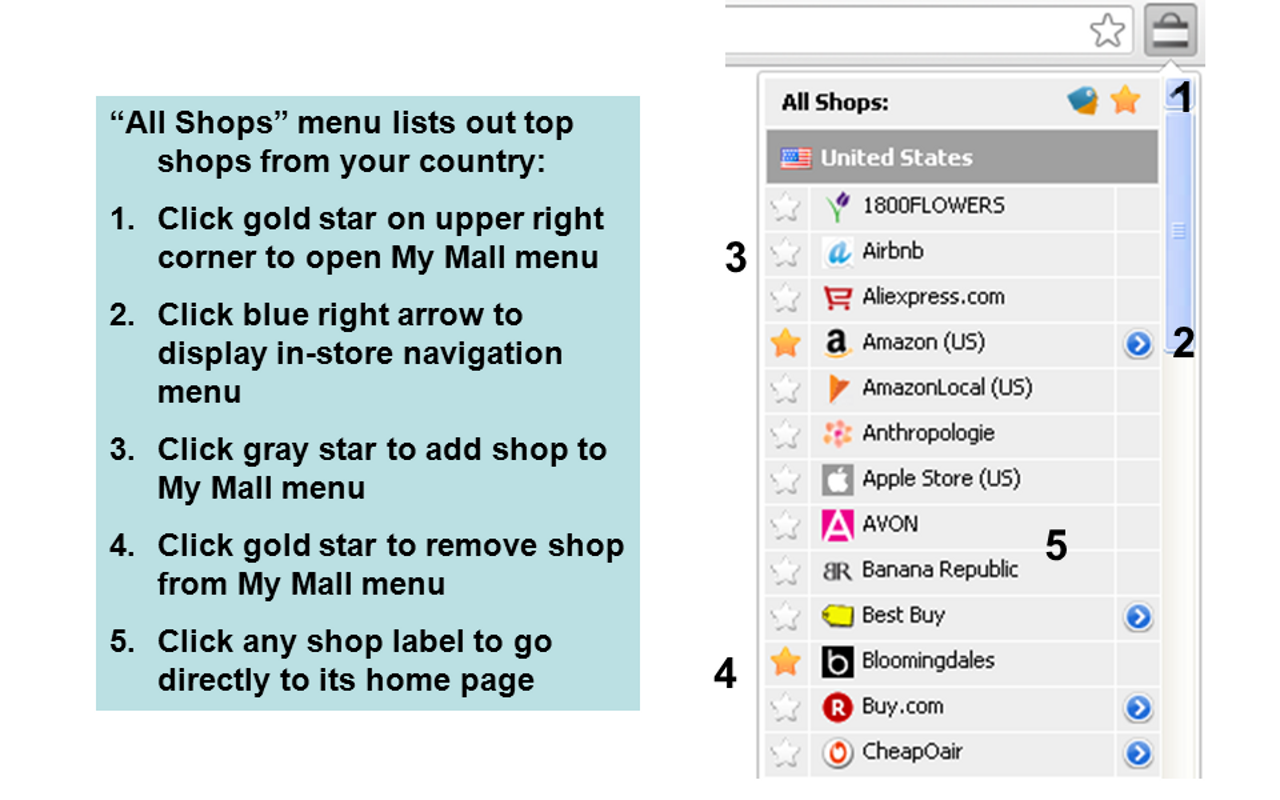
"all shops" menu
“all shops” menu

After installation completes, the “All Shops” menu  pops up when you click on  icon on tool bar , it lists out all shops available alphabetically by countries with stores in your preferred country listed at top.  In “All Shops” menu you may navigate to store’s homepage by directly clicking on the store menu item, open in-store navigation menu for a particular store or configure your preferred store list – “My Mall” menu.
"my mall" menu
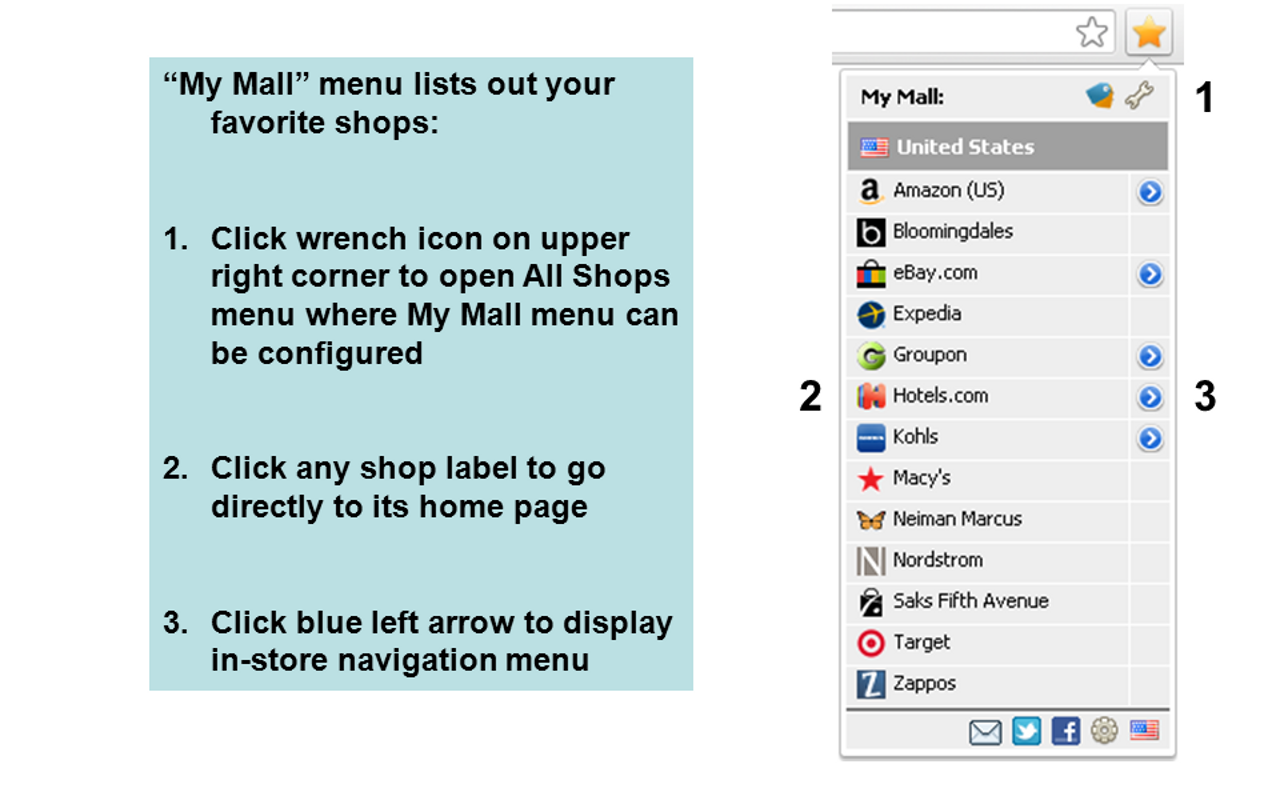
“my mall” menu

“My Mall” menu includes all your favorite shops which you configured in “All Shops” menu.  “My Mall” menu is a customized version of “All Shops” menu. From functionality perspective, you may accomplish same task as what you can do in “All Shops” menu: navigate to store’s homepage by directly clicking on the store menu item or open in-store navigation menu for a particular store.

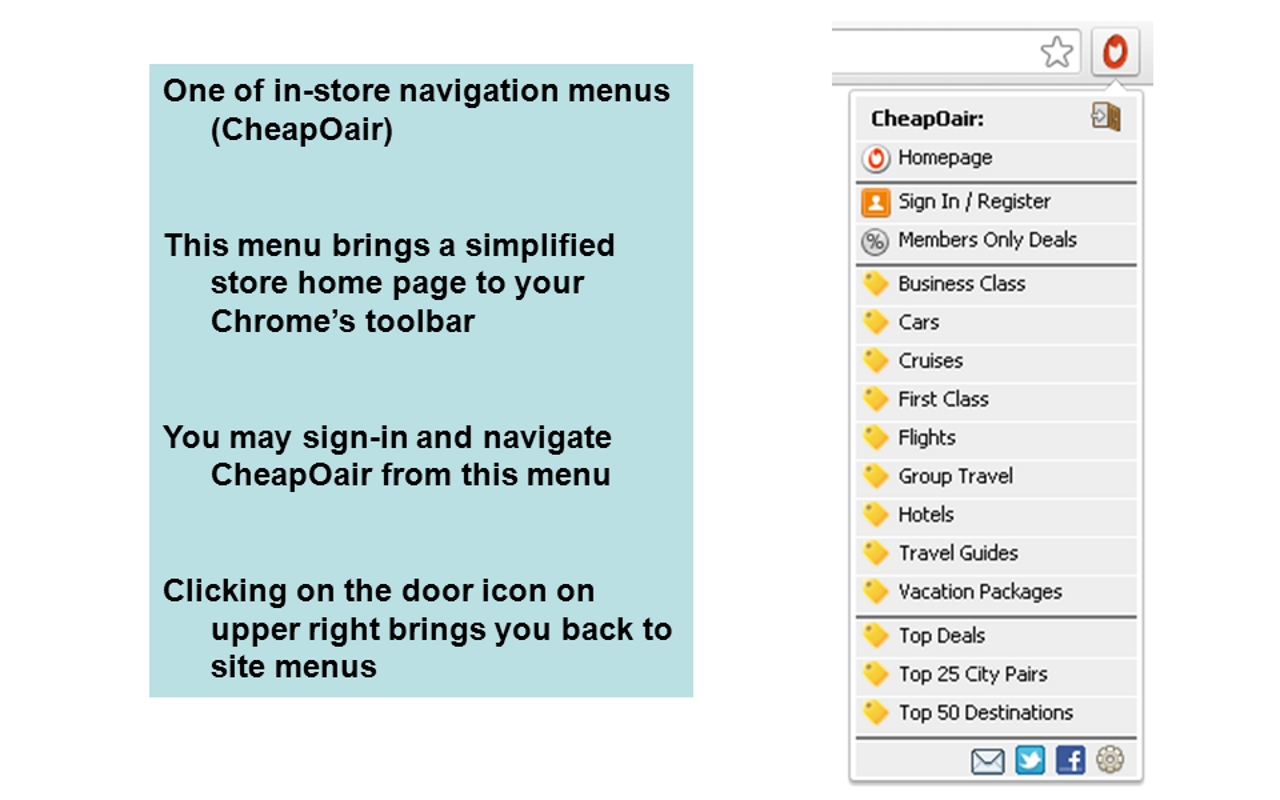
in store navigation menu for CheapOair

In-store navigation menu: some shops (such as Amazon, Best Buy etc.) with  on the left are equipped with their own menus where you may directly access major links within the shop with one click.  Clicking on  icon will display the shop’s in-store navigation menu.

Chrome Add-on: Shopping Button Version 1.2012.9.20 Released

This is a new version release note of  Shopping Button, the extension is available for download now.

For a complete user manual of this add-on, please visit here.

This is a maintenance release, changes and fixes are

  • Added new merchants for US customers
    1. Kohls
    2. Shopbop
    3. Staples
    4. Crocs
  • Bug fixes: popup window resizing

For updates and new versions, please follow us on Twitter @linked8.

Chrome Extension: BookmarkMatic for Shoppers (a.k.a. Shopping Button)

BookmarkMatic for Shoppers (short name: BMfS, a.k.a. Shopping Button) automatically converts and organizes your shopping browser history into bookmarks.

Why was BMfS created?

People spend a lot of time creating and organizing bookmarks on favorite links.   Is it possible to automatically identify and organize favorite links?   We believe the answer is yes, it’s doable by properly analyzing browser history data,  BMfS is our first step of tackling this problem through developing history analyzing algorithms and applications.

How does BMfS work?

It’s one thing to set up an ambitious objective, it is totally another thing to achieve it.  To achieve the goal of analyzing browser history and come up with good results, we will need to have a good knowledge of websites, what they are about, what they do for people, etc.

To start, we built a list of supported shopping sites most of them are top-ranking online shopping websites, as top-ranking sites have bigger audience bases and therefore are more valuable to users.

As of December 2013, BMfS supports 700+ top-ranking shopping related sites in 43 countries, representing 7%+ of  top 10,000 Alexa ranked websites worldwide. These sites cover end-to-end shopping needs including online shopping, offline shopping, shopping guide, automobile, real estate, travel, and even betting and gambling.

Here is how BMfS works in action:

  1. Filter out your shopping browser history:  Every time when BMfS is enabled in your browser, it scans your browser history and filters out your visits to shopping sites supported by BMfS.
  2. Build sorted and categorized lists of links:  With shopping histories filtered out from your overall browser history, BMfS then automatically categorizes these sites to a few main categories: online shopping, offline shopping, shopping guide, travel, car buying, real estate and online betting.   You may also easily configure BMfS to sort sites or links within any site by visit frequency, visit time or alphabet.

Features

Your shopping sites, categorized automatically.  Manually created browser bookmarks are usually organized and categorized.   In this version, BMfS is making the first step of categorizing sites automatically.  All shopping sites you visited can be either viewed in 1 list or filtered from 1 of 7 pre-set major categories: Online Shopping, Local Shopping, Shopping Guide, Travel, Online Betting, Real Estate and Cars.

Your shopping sites, sorted in 1 of 3 ways automatically.  How links are sorted is important in manually created bookmarks since it determines how convenient each link can be accessed. BMfS introduces 3 sorting orders to automatically sort any list of sites: Visit Frequency, Visit Time or Site Names (alphabetic A-Z).

Your shopping links, sorted in 1 of 3 ways automatically.  In addition to organized shopping sites you have visited, you are also able to drill down to link level within any sites, again, these are all links you have been to before.  All these links are sorted by one of 3 choices: Visit Frequency, Visit Time or Link Title.

Review

As seen on Brand Thunder

Organize all of your favorite shopping sites in one place with this Chrome shopping extension. If you’re an avid online shopper during the holiday season, this is a must-have add-on, as it organizes the shopping sites you visit most into an easily accessible pop-up menu directly in your browser.

Screen Shots

Please click on the image below to start slideshow
[slideshow id=1 w=640 h=400]

Disclaimers

  1. Browser permissions requested (why they are needed): 1. Access your data on bookmarkmatic.com to make it possible to sync history data between your browser and server (it’s disabled by default); 2. Read and modify your browser history data (we use this permission to read your browser history data in order to analyze it, we only read and never modify your browser history data); 3. Access your tabs and browsing activity (we use this permission so that you may open an automatically generated bookmark link in current tab or a new tab, that’s it. We don’t need to access your browsing activity)
  2. Privacy Policy 1: This extension analyzes your browser history data to better serve your shopping needs, the processing of your browser history data is currently done 100% locally on your computer. We may roll out feature which may require your history data to be processed remotely, at that time, we will ask explicitly for your permission to do so and you will have option to accept or decline that feature, and we will not start transmitting your data without your explicit consent.
  3. Privacy Policy 2: This extension uses Google Analytics to collect summary-level anonymous extension usage statistics to help improve user experience. If you want to opt-out, please visit http://tools.google.com/dlpage/gaoptout
  4. Brand Disclaimers: Google Chrome® and Google® logos are registered trademarks of Google Inc.  Logos and names etc. of all shopping websites including Amazon®, eBay®, etc. are used for promotional purposes only with no ownership implied nor claimed.

If you like it, we’d appreciate if you’d rate it with a 5 star (see below) and tell your friends! If you think it falls short in anyway, please let us know what you didn’t like, so it will get fixed ASAP.