Category Archives: AmaBay

Chrome Extension: AmabayChrome version 1.2012.12.20 released

This is a new version release note of AmabayChrome which enables one click compare Amazon and eBay prices from Google Chrome browser.

This version is a maintenance release, the major change is to be compatible with latest policy requirements of Google Chrome team on Chrome extensions.

For complete user manual of this extension, please visit here.

Happy new year

Firefox Addon: AmabayFox New Version 1.4.20121120 Released

iconThis is a new version release note of AmabayFox(this version is available to download soon)

View a complete user manual of this addon.

This version is a maintenance version, major change was to make it compatible with Firefox version 17.0 and up.  The previous version 1.3.20110630 is compatible up to Firefox 16.*

For future updates, please follow us on Twitter @linked8

Chrome Extension: AmabayChrome version 1.2012.1.22 released

This is a new version release note of AmabayChrome which enables one click compare Amazon and eBay prices from Google Chrome browser.

This version is an maintenance release with bug fixes, one of the bug that got fixed was error URL when visitor compare price by clicking on address bar button when visiting any product page on Amazon or eBay.

For complete user manual of this extension, please visit here.

Firefox Addon: AmabayFox New Version 1.3.20110630 Released

iconThis is a new version release note of AmabayFox(this version is available to download soon)

View a complete user manual of this addon.

In this new version of AmabayFox, Firefox Browser Addon, here are the new features:

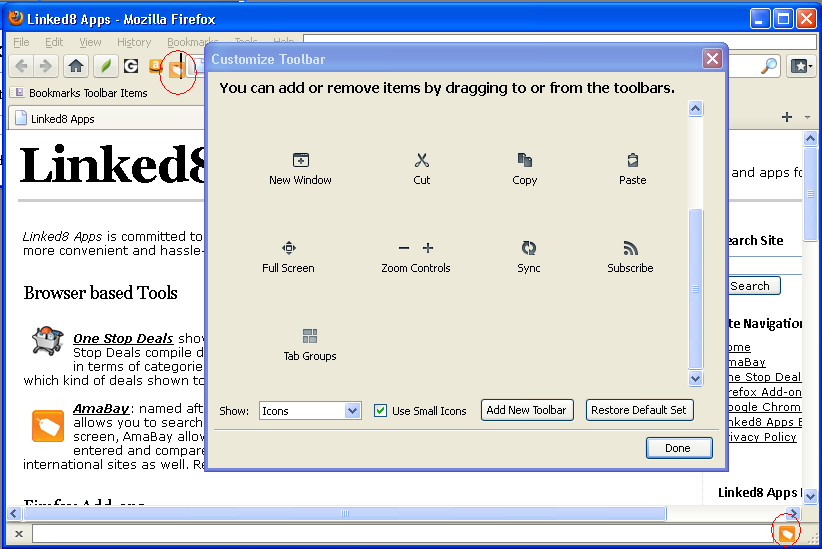
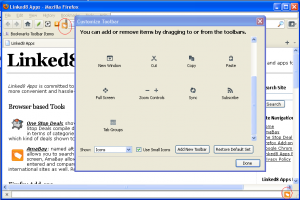
  • You may now place the AmabayFox button  wherever you like, the locations you can choose from include menu bar, navigation bar or add-on bar.  By default, after install, AmabayFox button will be placed on navigation bar, after that, you may change its location by doing the following:
    • Right click on any Firefox browser bar area, click “Customize”
    • After Customize Toolbar window popup, use your mouse drag and drop the button to the bar you want
    • Close Customize Toolbar window, all set!
  • You may now configure the default locale of Amabay homepage by one of the following ways:
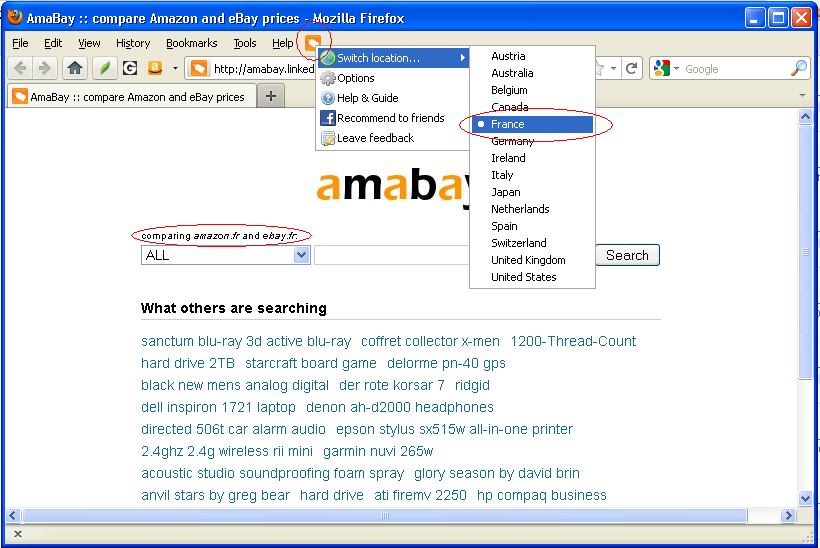
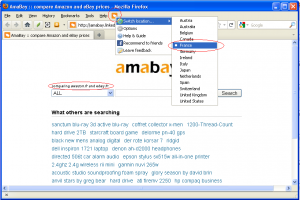
    • Right click on AmabayFox button, choose from “Switch location” menu
    • Right click on AmabayFox button, click “Options”

If you are using this tool and have feature request, please fill out form here.


AmaBay new features: region support, new look and more…

We felt that AmaBay need some major face lift, so we renovated the site and added a couple of new features:

First of all, we combined ebay and amazon regions into one, user will be able to choose once instead of twice.  Here is some background of this issue: even though eBay and Amazon are both global eCommerce companies, they support different countries, with eBay supports more while Amazon supports less, the countries where Amazon has presence all have eBay presence except Japan, while a couple of eBay present countries do not have Amazon presence, for example, Austria, Australia, Belgium, Ireland, etc… For this reason, we initially kept country selector for eBay and Amazon separate.  Now we are merging them together because it’s what user needed, we should do what’s easier for user, not what’s easier for us.

Secondly, we made the search result page cleaner.  We removed a couple of notes for each product, Product Group, Manufacturer under Amazon, Time Left under eBay.  Now these notes can be seen in tooltip window when you move mouse over images.   After this change, the result page only displays product images, title and prices, because these are what visitors really care about.

Lastly, we are making the mouse over tooltip image larger and clickable.  Right now, only the Amazon side of results have large images added to tooltip window, we are still working on eBay side, but the pictures on both sides are already clickable, clicking on it will lead to product detail page on eBay or Amazon.  On Amazon side, try moving your mouse over any product images, you will see large image of this product with great details.  I don’t know what you think, but I am very visually driven when I do shopping, so with large pictures viewable, it’s more likely that I will buy the product.

Please feel free to leave your feedback or request for features to info@linked8.com

June 18, 2011 Update: after AmaBay region feature change, Firefox Addon AmabayFox 1.2.20110115 users will experience a bug when they compare price from Amazon or eBay non-US site, the result page will always use US as region.  Now this bug has been fixed.  Sorry about the inconvenience.

Chrome Add-on: AmabayChrome – Compare Amazon and eBay Prices

AmabayChrome, (old link to app no longer working) allows you to use amabay.linked8.com to compare prices between Amazon and eBay for any product by one click.

How AmabayChrome Works

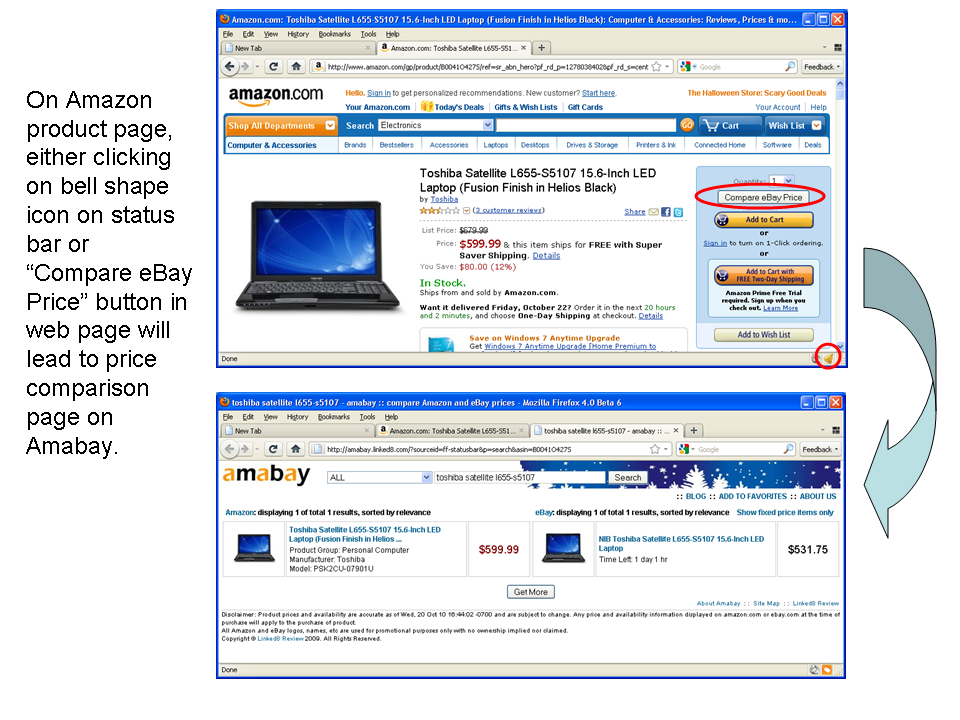
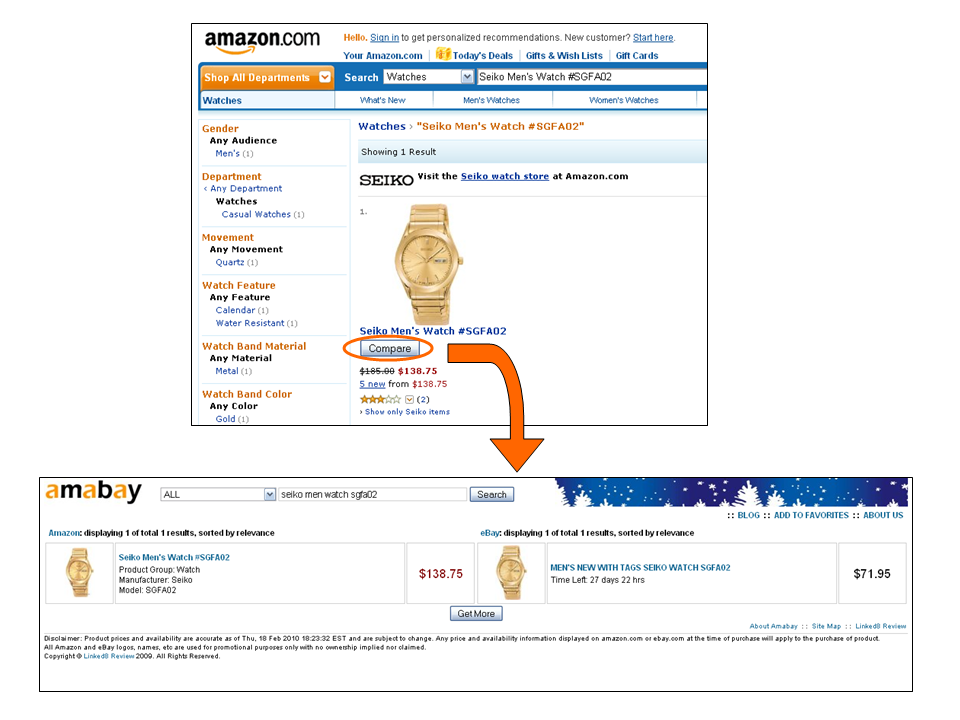
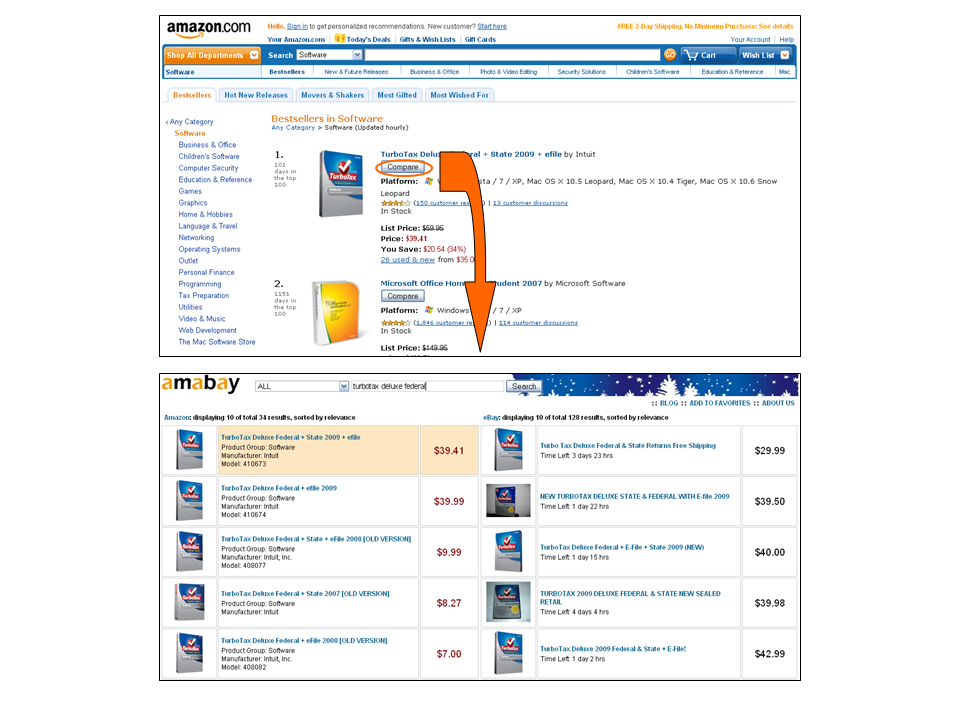
On Amazon.com, Amazon.co.uk, Amazon.de, and Amazon.co.jp sites, “Compare eBay Price” button appears on Amazon product search result and product detail pages, clicking on it leads to Amabay price comparison page for that product.

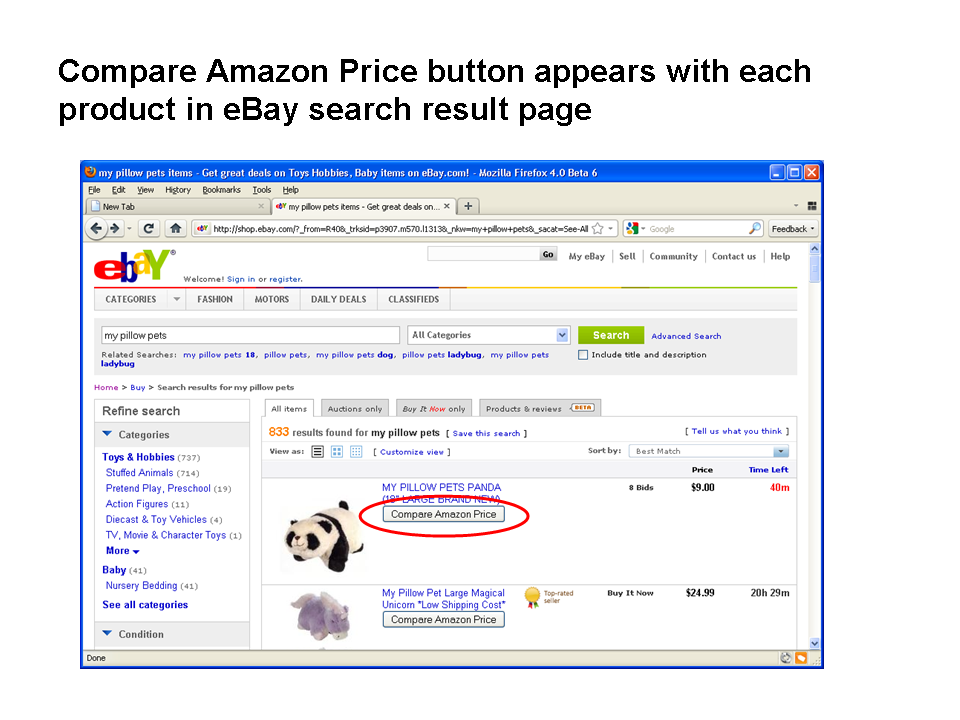
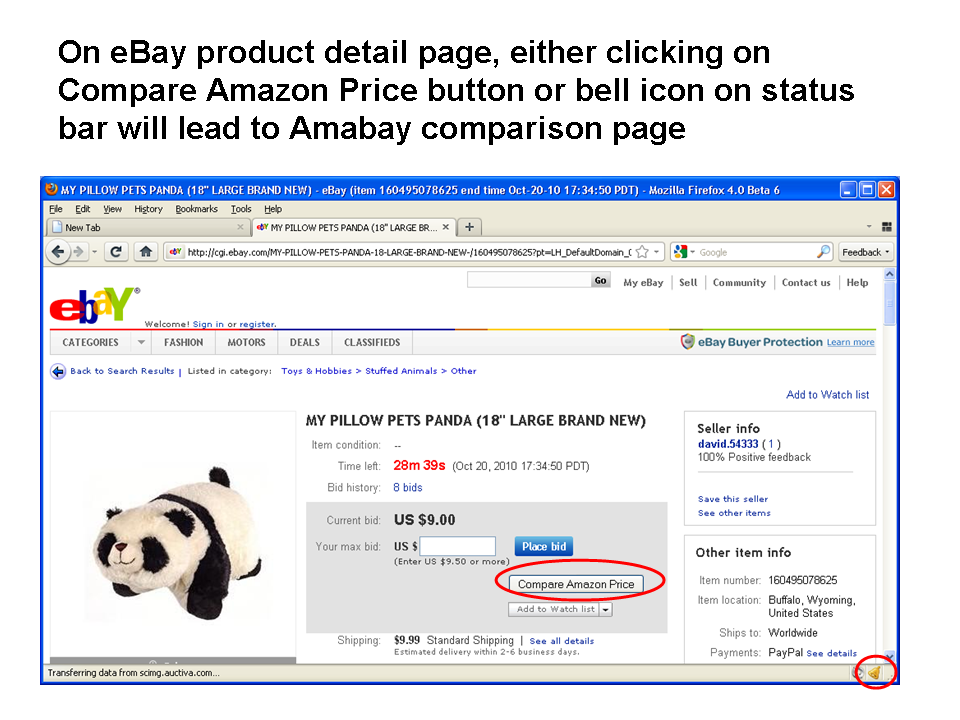
On ebay.com, ebay.co.uk, ebay.de, ebay.fr, ebay.ca, ebay.at, ebay.co.au, ebay.it, ebay.es, ebay.nl, and ebay.be sites, “Compare Amazon Price” button appears on eBay product search result and product detail pages, clicking on it leads to Amabay price comparison page for that product.

International Support

AmabayChrome works on Amazon US, UK, Japan, Germany sites and eBay US, UK, Germany, France, Canada, Austria, Australia, Italy, Spain, Netherlands, Switzerland, and Ireland sites. In most cases, regions are automatically detected.

Automatically detect region

When you click “Compare Price” button on eBay or Amazon pages, or bell button on address bar, region setting is automatically detected.

When regions are automatically detected, in most situations, Amazon and eBay prices in the same country will be compared, for example, if you click from Amazon.co.uk, you get result between Amazon.co.uk and eBay.co.uk. However, for a small number of countries, because they are not supported by eBay or Amazon, you’ll need to compare with other country’s results. These situations include:

  • click from amazon.co.jp, you get amazon.co.jp vs. ebay.com
  • click from ebay.ie, you get amazon.co.uk vs. ebay.ie
  • click from ebay.co.au, you get amazon.com vs. ebay.co.au
  • click from ebay.be, ebay. at, ebay.es, ebay.it, ebay.ch, or ebay.nl, you get amazon.de vs. these countries’ ebay results

Manually set region

When you click on AmaBay button on address bar to open AmaBay homepage, its default region is manually selected in option page.

Related Tools

Firefox version: AmabayFox (user manual)

Firefox Addon: AmabayFox New Version 1.2.20101231 Released

iconThis is a new version release note of AmabayFox. (this version is available to download)

View a complete user manual of this addon.

We’ve released a new version of AmabayFox, the major improvement was to support Amazon and eBay international sites.   Amazon US, UK, Japan, Germany sites and eBay US, UK, Germany, France, Canada, Austria, Australia, Italy, Spain etc. sites are now supported, now you may compare Amazon and eBay prices from all the above country websites.

We try to compare prices between Amazon and eBay in the same country, and it’s true for most countries for example, if you click from Amazon.co.uk, you get result between Amazon.co.uk and eBay.co.uk.  For a small number of other countries, because  they are not supported by eBay or Amazon, you’ll need to compare with another country’s results. These situations include:

  • click from amazon.co.jp, you get amazon.co.jp vs. ebay.com
  • click from ebay.ie,  you get amazon.co.uk vs. ebay.ie
  • click from ebay.co.au, you get amazon.com vs. ebay.co.au
  • click from ebay.be, ebay. at, ebay.es, ebay.it, ebay.ch, or ebay.nl,  you get amazon.de vs. these countries’ ebay results

Firefox Addon: AmabayFox – One Click Compare Amazon and eBay Prices

AmabayFox allows you to compare eBay price from Amazon sites and compare Amazon price from eBay sites by single click while you surf either site,  so that you can find the best deal available right now.  AmabayFox works on Amazon US, UK, Japan, Germany sites and eBay US, UK, Germany, France, Canada, Austria, Australia, Italy, Spain, Ireland, Netherlands, and Switzerland sites.

DOWNLOAD AmabayFox at Firefox Addon website.

Where to find AmabayFox

AmabayFox button (the orange button)

  • AmabayFox button shows up on Firefox browser after install. You may place the button wherever you want. (see screenshot above)
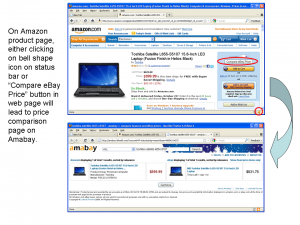
  • On Amazon or eBay product detail page, the button changes to bell shape, clicking on it leads you directly Amabay price comparison page for this product.
  • On any other web pages, the button is a shopping bag icon, clicking on it leads you to Amabay home page. The Amabay home page’s locale can be configured.

Amazon and eBay sites

  • On Amazon.com, Amazon.co.uk, Amazon.de, and Amazon.co.jp sites, “Compare eBay Price” button appears on Amazon product search result and product detail pages, clicking on it leads to Amabay price comparison page for that product.
  • On ebay.com, ebay.co.uk, ebay.de, ebay.fr, ebay.ca, ebay.at, ebay.co.au, ebay.it, ebay.es, ebay.nl, and ebay.be sites, “Compare Amazon Price” button appears on eBay product search result and product detail pages, clicking on it leads to Amabay price comparison page for that product.

International Support

AmabayFox works on Amazon US, UK, Japan, Germany sites and eBay US, UK, Germany, France, Canada, Austria, Australia, Italy, Spain, Netherlands, Switzerland, and Ireland sites.

In most cases, Amazon and eBay prices in the same country will be compared, for example, if you click from Amazon.co.uk, you get result between Amazon.co.uk and eBay.co.uk. However, for a small number of countries, because they are not supported by eBay or Amazon, you’ll need to compare with other country’s results. These situations include:

  • click from amazon.co.jp, you get amazon.co.jp vs. ebay.com
  • click from ebay.ie,  you get amazon.co.uk vs. ebay.ie
  • click from ebay.co.au, you get amazon.com vs. ebay.co.au
  • click from ebay.be, ebay. at, ebay.es, ebay.it, ebay.ch, or ebay.nl,  you get amazon.de vs. these countries’ ebay results

Screenshot Gallery
Slide5

By default, clicking on the shopping tag icon leads to Amabay home page.  You may change the homepage’s default locale by right clicking on button, then choose locale in Switch location menu
Slide6Slide7

AmabayFox1AmabayFox2

You may place AmabayFox button wherever you want on Firefox browser
Addon Description

Are you a fan of Amazon or eBay, or are you just a fan of good products at lowest price? No matter which type you fit in, AmabayFox allows you to search both Amazon and eBay for a product and compare prices between these two online shops side by side to find best deals.

In addition to that, unlike other price comparison Firefox Addons which force you to choose your keyword by either typing or highlighting, AmabayFox places a down-to-earth Compare button beside the product you are browsing on online shop website (currently Amazon, more shops to be added), all you need is one click on the button, and there you go with Amazon and eBay prices side by side displayed in front of you.

There is no permanent toolbar or button on your browser that comes with AmabayFox, since the AmabayFox button only shows up when you are on product web page.

Awards

AmabayFox downloadIn December 2010, AmabayFox Firefox add-on was granted the “Editor’s Pick Award” by FamousWhy.com.

AmaBay: eBay vs. Amazon price comparison

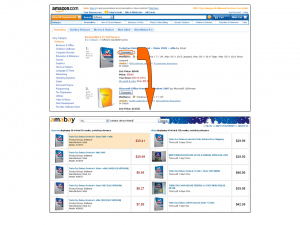
AmaBay is an online service created by Linked8 Apps in 2009 to enable online shoppers to easily compare Amazon and eBay prices for any product for all countries covered by Amazon and eBay.  As its name indicates, AmaBay = Ama(zon) + (e)Bay, its search result combines those of Amazon and eBay for a certain keyword in the same screen.

How to Use AmaBay

You can start comparing prices in either of the following ways:

  1. through browser add-ons (AmabayFox for Firefox and AmabayChrome for Google Chrome), this way is the easiest.  The browser add-ons put a small button on browser toolbar or address bar when you are viewing any eBay or Amazon product page, one click on that button will show you the Amazon or eBay prices for that product or similar products.
  2. through AmaBay website (http://amabay.linked8.com), just like how you search a keyword on Google, you go to AmaBay homepage, enter a keyword, then hit search button, then AmaBay will search Amazon and eBay databases and throws out most relevant products from both Amazon and eBay side by side.

Amazon vs. eBay, price and beyond

AmaBay is both a price research tool and a product research tool.  Using this tool, you can research any product and find interesting differences between Amazon and eBay:

Generally, Amazon is more specialized in branded products, due to this reason, Amazon is more often to be chosen to be the official retail channel for well-known brands, such as Microsoft Zune HD video mp3 player.  In addition, Amazon also offers free shipping on any $25 or greater orders and pays return shipping on items shipped by Amazon.com itself.

eBay is more specialized in non-branded, commodity like products, such as car mp3 player FM transmittter, more often than not you can find better deals on eBay than on Amazon for these products.

However, these guidelines are not true in many cases, eBay can offer unbeatable price on branded products for example, Brother QL-570 label printer, while Amazon could offer great deals on non-brand products such as car charger socket power splitter.  Therefore, you want to use amabay to research any individual product before you conclude which retailer offer the best price.

Frequently Asked Questions

What are Amazon prices?

There are four types of Amazon prices:

  • Amazon listing featured price
  • Lowest price for new product
  • Too low to display: you have to go to Amazon.com, add the product to shopping cart to see the price
  • Currently unavailable

What are eBay prices?

eBay prices are the sum of product price and shipping fee.