Tag Archives: AmabayFox

Firefox Addon: AmabayFox New Version 1.4.20121120 Released

iconThis is a new version release note of AmabayFox(this version is available to download soon)

View a complete user manual of this addon.

This version is a maintenance version, major change was to make it compatible with Firefox version 17.0 and up.  The previous version 1.3.20110630 is compatible up to Firefox 16.*

For future updates, please follow us on Twitter @linked8

Firefox Addon: AmabayFox New Version 1.3.20110630 Released

iconThis is a new version release note of AmabayFox(this version is available to download soon)

View a complete user manual of this addon.

In this new version of AmabayFox, Firefox Browser Addon, here are the new features:

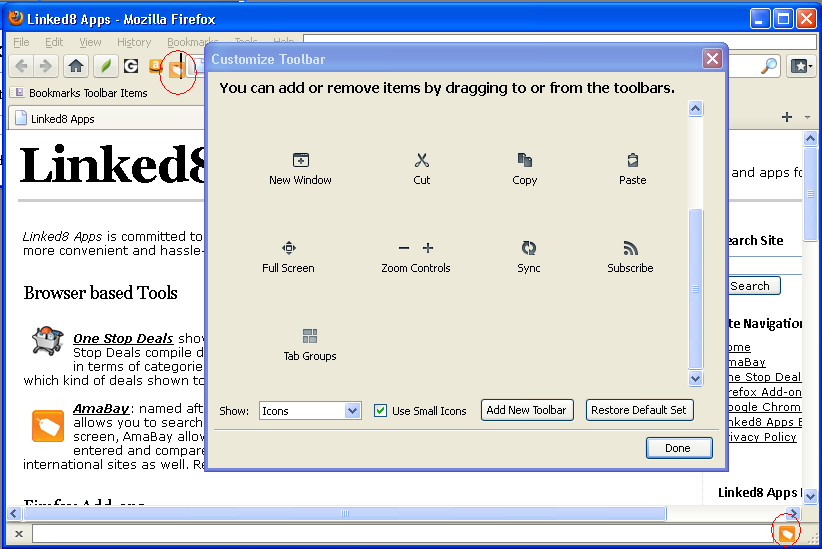
  • You may now place the AmabayFox button  wherever you like, the locations you can choose from include menu bar, navigation bar or add-on bar.  By default, after install, AmabayFox button will be placed on navigation bar, after that, you may change its location by doing the following:
    • Right click on any Firefox browser bar area, click “Customize”
    • After Customize Toolbar window popup, use your mouse drag and drop the button to the bar you want
    • Close Customize Toolbar window, all set!
  • You may now configure the default locale of Amabay homepage by one of the following ways:
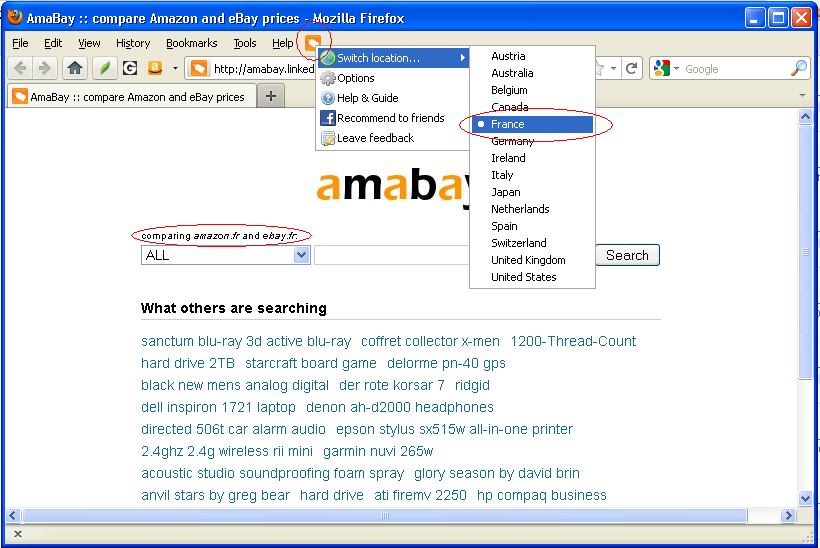
    • Right click on AmabayFox button, choose from “Switch location” menu
    • Right click on AmabayFox button, click “Options”

If you are using this tool and have feature request, please fill out form here.


Chrome Add-on: AmabayChrome – Compare Amazon and eBay Prices

AmabayChrome, (old link to app no longer working) allows you to use amabay.linked8.com to compare prices between Amazon and eBay for any product by one click.

How AmabayChrome Works

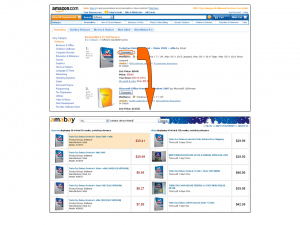
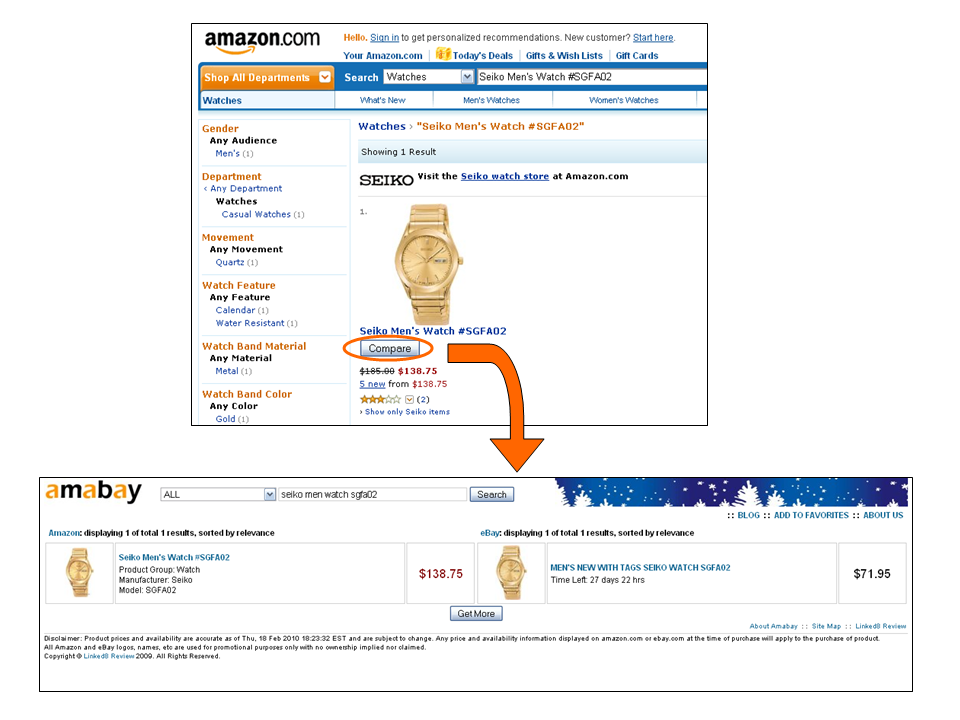
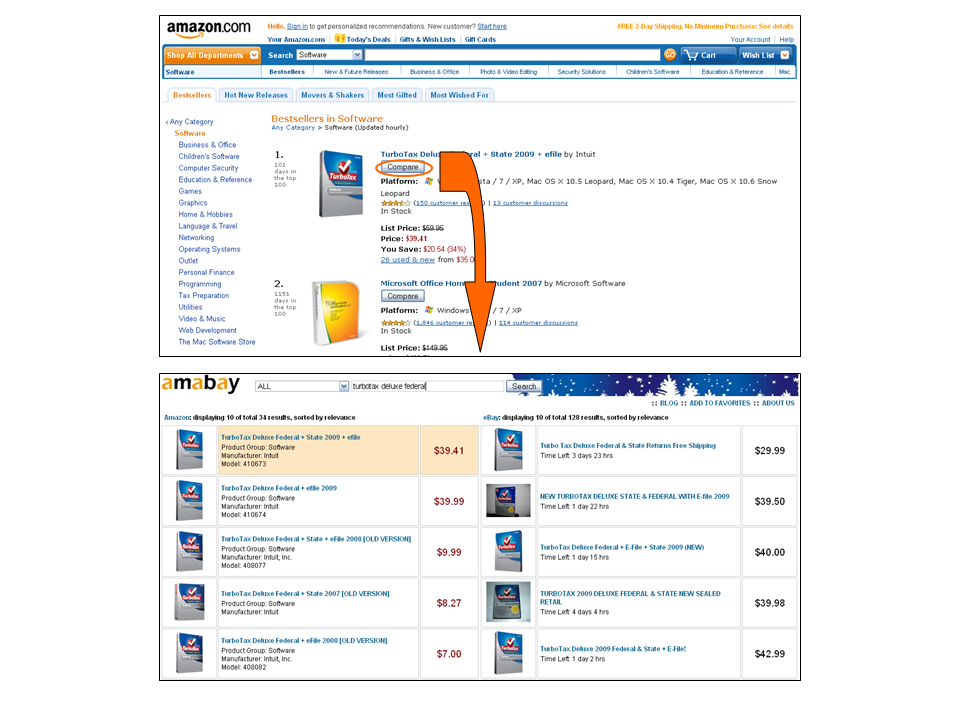
On Amazon.com, Amazon.co.uk, Amazon.de, and Amazon.co.jp sites, “Compare eBay Price” button appears on Amazon product search result and product detail pages, clicking on it leads to Amabay price comparison page for that product.

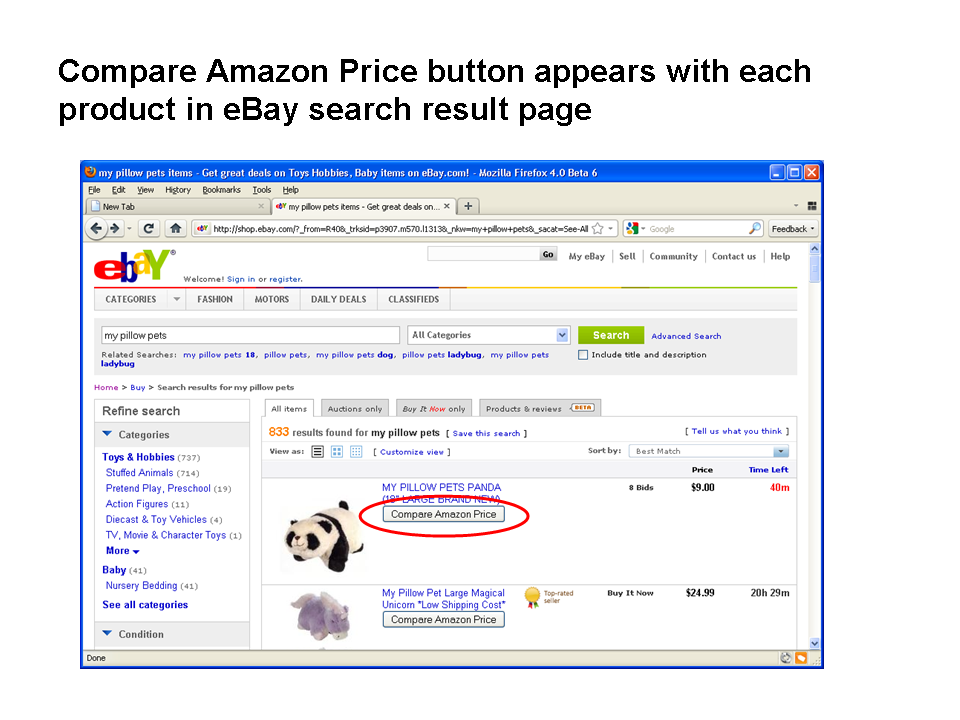
On ebay.com, ebay.co.uk, ebay.de, ebay.fr, ebay.ca, ebay.at, ebay.co.au, ebay.it, ebay.es, ebay.nl, and ebay.be sites, “Compare Amazon Price” button appears on eBay product search result and product detail pages, clicking on it leads to Amabay price comparison page for that product.

International Support

AmabayChrome works on Amazon US, UK, Japan, Germany sites and eBay US, UK, Germany, France, Canada, Austria, Australia, Italy, Spain, Netherlands, Switzerland, and Ireland sites. In most cases, regions are automatically detected.

Automatically detect region

When you click “Compare Price” button on eBay or Amazon pages, or bell button on address bar, region setting is automatically detected.

When regions are automatically detected, in most situations, Amazon and eBay prices in the same country will be compared, for example, if you click from Amazon.co.uk, you get result between Amazon.co.uk and eBay.co.uk. However, for a small number of countries, because they are not supported by eBay or Amazon, you’ll need to compare with other country’s results. These situations include:

  • click from amazon.co.jp, you get amazon.co.jp vs. ebay.com
  • click from ebay.ie, you get amazon.co.uk vs. ebay.ie
  • click from ebay.co.au, you get amazon.com vs. ebay.co.au
  • click from ebay.be, ebay. at, ebay.es, ebay.it, ebay.ch, or ebay.nl, you get amazon.de vs. these countries’ ebay results

Manually set region

When you click on AmaBay button on address bar to open AmaBay homepage, its default region is manually selected in option page.

Related Tools

Firefox version: AmabayFox (user manual)

Firefox Addon: AmabayFox New Version 1.2.20101231 Released

iconThis is a new version release note of AmabayFox. (this version is available to download)

View a complete user manual of this addon.

We’ve released a new version of AmabayFox, the major improvement was to support Amazon and eBay international sites.   Amazon US, UK, Japan, Germany sites and eBay US, UK, Germany, France, Canada, Austria, Australia, Italy, Spain etc. sites are now supported, now you may compare Amazon and eBay prices from all the above country websites.

We try to compare prices between Amazon and eBay in the same country, and it’s true for most countries for example, if you click from Amazon.co.uk, you get result between Amazon.co.uk and eBay.co.uk.  For a small number of other countries, because  they are not supported by eBay or Amazon, you’ll need to compare with another country’s results. These situations include:

  • click from amazon.co.jp, you get amazon.co.jp vs. ebay.com
  • click from ebay.ie,  you get amazon.co.uk vs. ebay.ie
  • click from ebay.co.au, you get amazon.com vs. ebay.co.au
  • click from ebay.be, ebay. at, ebay.es, ebay.it, ebay.ch, or ebay.nl,  you get amazon.de vs. these countries’ ebay results

Firefox Addon: AmabayFox New Version 1.1.20101031 Released

iconThis is a new version release note of AmabayFox. (this version will be available to download soon)

View a complete user manual of this addon.

We’ve released a new version of AmabayFox, the major improvement was to include eBay US site.

New features include:

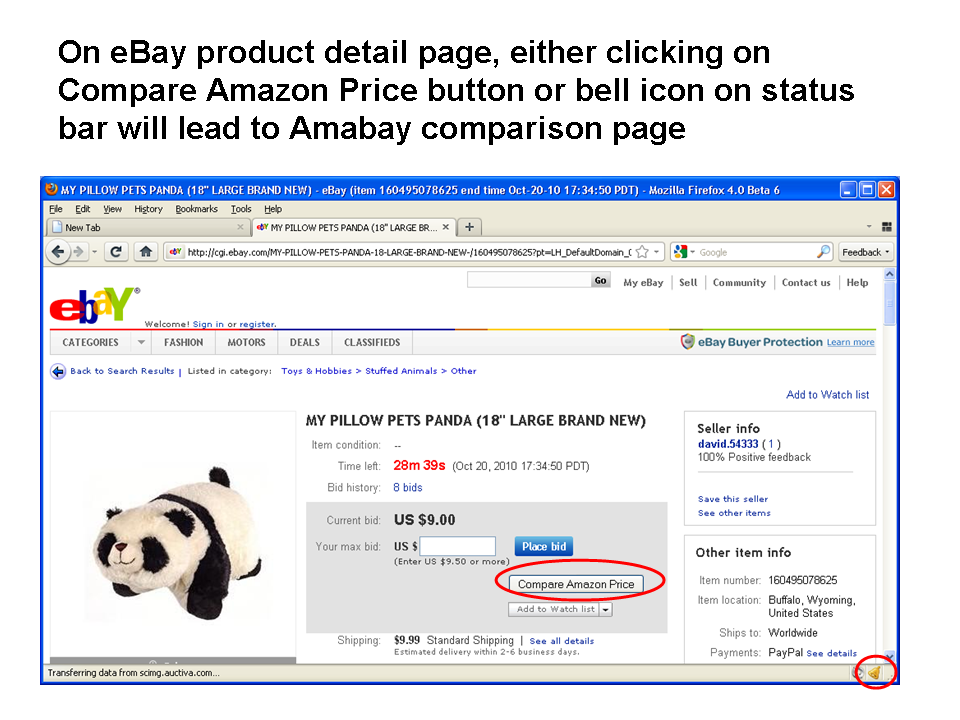
Now you can compare Amazon price by clicking on a button on search result or product detail pages, the button is unobtrusively placed by AmabayFox.  Currently it only works with eBay US site.

Status bar icon added, clicking on it will lead to Amabay result:

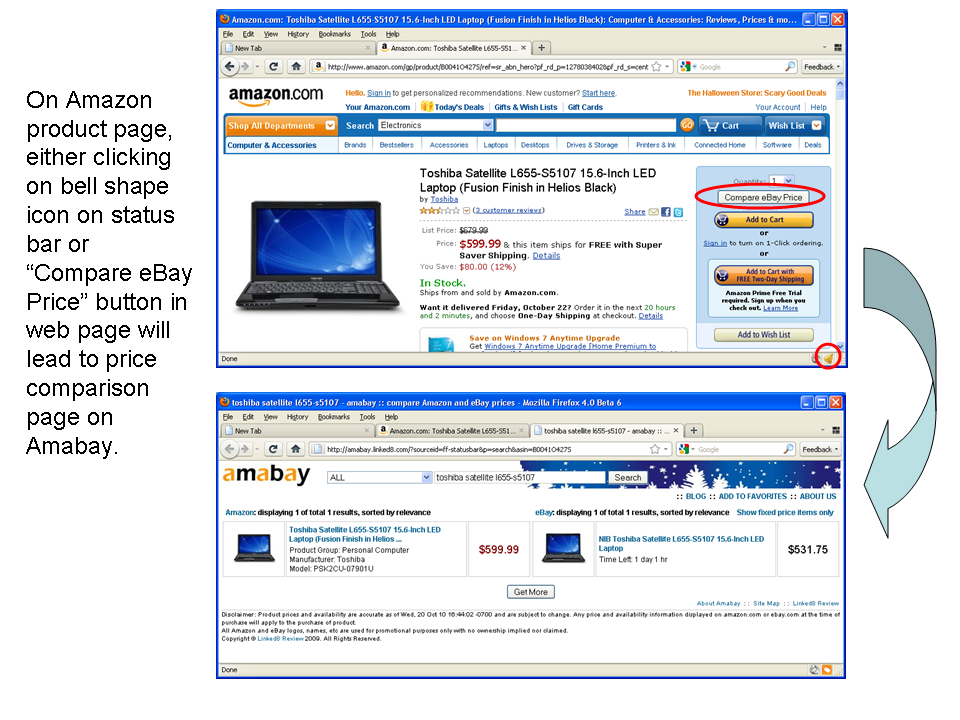
  • At any Amazon or eBay product detail page, status bar icon will change to a “bell”, clicking on it will lead to price comparison results.
  • At any other web pages, the status bar icon remains a “shopping bag”, clicking on it leads to Amabay homepage.

Firefox Addon: AmabayFox – One Click Compare Amazon and eBay Prices

AmabayFox allows you to compare eBay price from Amazon sites and compare Amazon price from eBay sites by single click while you surf either site,  so that you can find the best deal available right now.  AmabayFox works on Amazon US, UK, Japan, Germany sites and eBay US, UK, Germany, France, Canada, Austria, Australia, Italy, Spain, Ireland, Netherlands, and Switzerland sites.

DOWNLOAD AmabayFox at Firefox Addon website.

Where to find AmabayFox

AmabayFox button (the orange button)

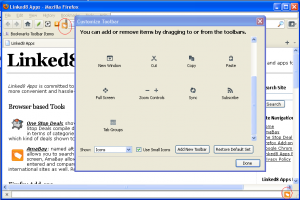
  • AmabayFox button shows up on Firefox browser after install. You may place the button wherever you want. (see screenshot above)
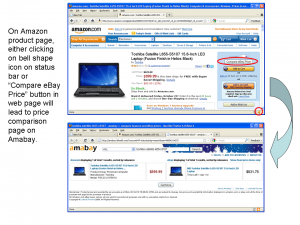
  • On Amazon or eBay product detail page, the button changes to bell shape, clicking on it leads you directly Amabay price comparison page for this product.
  • On any other web pages, the button is a shopping bag icon, clicking on it leads you to Amabay home page. The Amabay home page’s locale can be configured.

Amazon and eBay sites

  • On Amazon.com, Amazon.co.uk, Amazon.de, and Amazon.co.jp sites, “Compare eBay Price” button appears on Amazon product search result and product detail pages, clicking on it leads to Amabay price comparison page for that product.
  • On ebay.com, ebay.co.uk, ebay.de, ebay.fr, ebay.ca, ebay.at, ebay.co.au, ebay.it, ebay.es, ebay.nl, and ebay.be sites, “Compare Amazon Price” button appears on eBay product search result and product detail pages, clicking on it leads to Amabay price comparison page for that product.

International Support

AmabayFox works on Amazon US, UK, Japan, Germany sites and eBay US, UK, Germany, France, Canada, Austria, Australia, Italy, Spain, Netherlands, Switzerland, and Ireland sites.

In most cases, Amazon and eBay prices in the same country will be compared, for example, if you click from Amazon.co.uk, you get result between Amazon.co.uk and eBay.co.uk. However, for a small number of countries, because they are not supported by eBay or Amazon, you’ll need to compare with other country’s results. These situations include:

  • click from amazon.co.jp, you get amazon.co.jp vs. ebay.com
  • click from ebay.ie,  you get amazon.co.uk vs. ebay.ie
  • click from ebay.co.au, you get amazon.com vs. ebay.co.au
  • click from ebay.be, ebay. at, ebay.es, ebay.it, ebay.ch, or ebay.nl,  you get amazon.de vs. these countries’ ebay results

Screenshot Gallery
Slide5

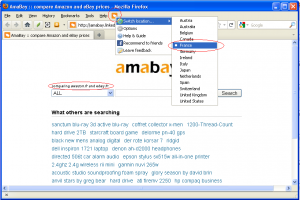
By default, clicking on the shopping tag icon leads to Amabay home page.  You may change the homepage’s default locale by right clicking on button, then choose locale in Switch location menu
Slide6Slide7

AmabayFox1AmabayFox2

You may place AmabayFox button wherever you want on Firefox browser
Addon Description

Are you a fan of Amazon or eBay, or are you just a fan of good products at lowest price? No matter which type you fit in, AmabayFox allows you to search both Amazon and eBay for a product and compare prices between these two online shops side by side to find best deals.

In addition to that, unlike other price comparison Firefox Addons which force you to choose your keyword by either typing or highlighting, AmabayFox places a down-to-earth Compare button beside the product you are browsing on online shop website (currently Amazon, more shops to be added), all you need is one click on the button, and there you go with Amazon and eBay prices side by side displayed in front of you.

There is no permanent toolbar or button on your browser that comes with AmabayFox, since the AmabayFox button only shows up when you are on product web page.

Awards

AmabayFox downloadIn December 2010, AmabayFox Firefox add-on was granted the “Editor’s Pick Award” by FamousWhy.com.