Category Archives: Release Notes

Chrome Add-on: Amazon™ Extension Version 1.2012.1.16 Released

This is a new version release note of Amazon™ Extension. (This version is available to download now)

For a complete user manual of this add-on, please visit here.

New features:

  • More Amazon country sites are supported, as of now, supported country sites are (China, Spain and Italy are newly added in this version):
    • United States (amazon.com)
    • United Kingdom (amazon.co.uk)
    • Germany (amazon.de)
    • France (amazon.fr)
    • Canada (amazon.ca)
    • China (amazon.cn)
    • Spain (amazon.es)
    • Italy (amazon.it)
  • If you are first time user, your country setting is automatically detected and set for you.

For updates and new versions, please follow us on Twitter @linked8.

Firefox Addon: AmabayFox New Version 1.3.20110630 Released

iconThis is a new version release note of AmabayFox(this version is available to download soon)

View a complete user manual of this addon.

In this new version of AmabayFox, Firefox Browser Addon, here are the new features:

  • You may now place the AmabayFox button  wherever you like, the locations you can choose from include menu bar, navigation bar or add-on bar.  By default, after install, AmabayFox button will be placed on navigation bar, after that, you may change its location by doing the following:
    • Right click on any Firefox browser bar area, click “Customize”
    • After Customize Toolbar window popup, use your mouse drag and drop the button to the bar you want
    • Close Customize Toolbar window, all set!
  • You may now configure the default locale of Amabay homepage by one of the following ways:
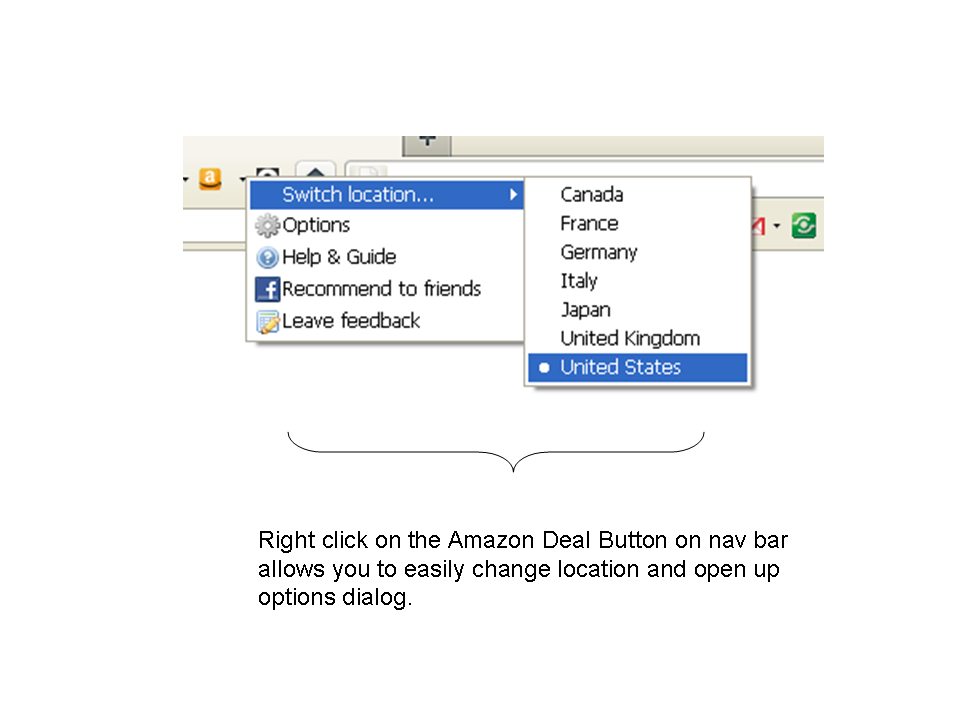
    • Right click on AmabayFox button, choose from “Switch location” menu
    • Right click on AmabayFox button, click “Options”

If you are using this tool and have feature request, please fill out form here.


Chrome Extension: AmabayChrome version 1.2011.5.29 released

This is a new version release note of AmabayChrome which enables one click compare Amazon and eBay prices from Google Chrome browser.

About 4 months after the release of 1st version, this 2nd version release is packed with exciting new features which will bring more convenience to your online shopping experience.  The  new features added to this version are:

  • “Compare Price” button location now configurable. Responding to needs from one of our users, now users can configure whether “Compare Price” buttons are displayed on Amazon / eBay search result pages.   By default, “Compare Price” buttons are shown on Amazon / eBay search result pages, but users can now turn that off in options page.  Please note, “Compare Price” button will always show up in Amazon / eBay product detail pages, this setting could not be changed.
  • Address bar button provides yet another way to click once to compare price. The button will selectively show up on right side of your address bar based on your current page and setting:
    • When you are viewing a product’s page on eBay or Amazon, the product information will be automatically detected, and a bell shaped button  will show up, clicking on it will show you AmaBay price comparison result for this product in a new tab.
    • When you are viewing other eBay or Amazon pages, the button’s shape will change to , clicking on it will lead you to the AmaBay homepage of your selected country.  You may change the country setting in Options page.  If you like this button so much that you want it to show up more often, you have the choice of make it appear when you view any pages on Internet, that setting can be changed in Options page.

For complete user manual of this extension, please visit here.


Firefox Add-on: Amazon Deal Button version 1.3.20110420 Released

Amazon Deal ButtonThis is a new version release note of Amazon Deal Button. (this version will be available to download soon)

View a complete user manual of this add-on.

Important: This version is compatible up to Firefox 9.* ONLY, if you use Firefox 10.* or higher, please download Amazon Deal Button version 1.4.20120210, which can be found here.

The change made to the latest version of Amazon Deal Button are:

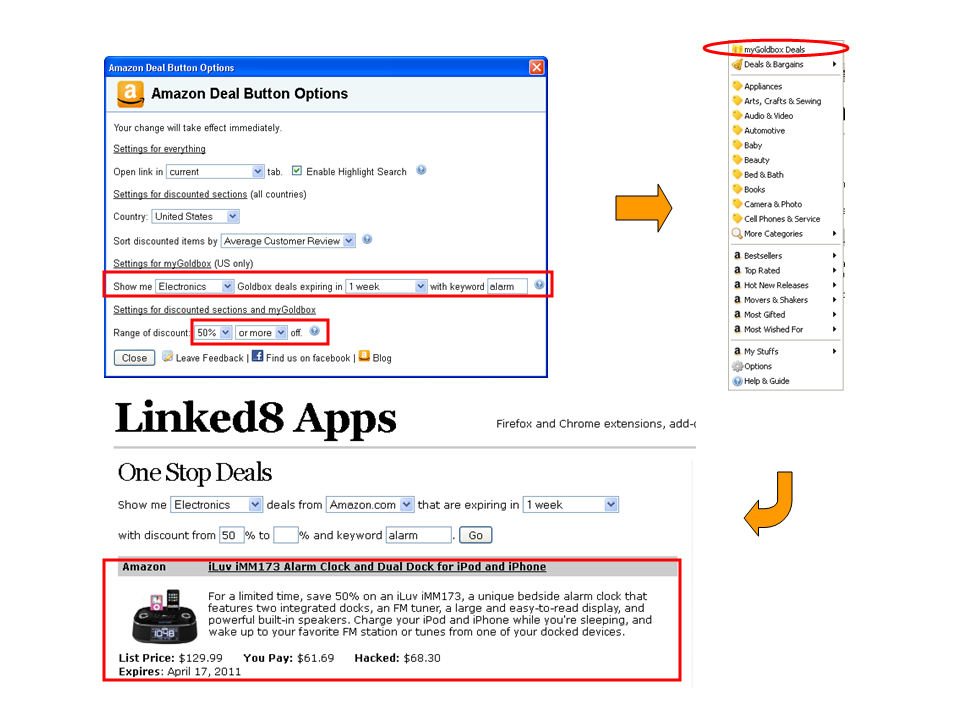
  • myGoldBox (US only), where your can check out personalized Amazon Gold Box deals based on your preference of category, discount range, expire date and keywords.

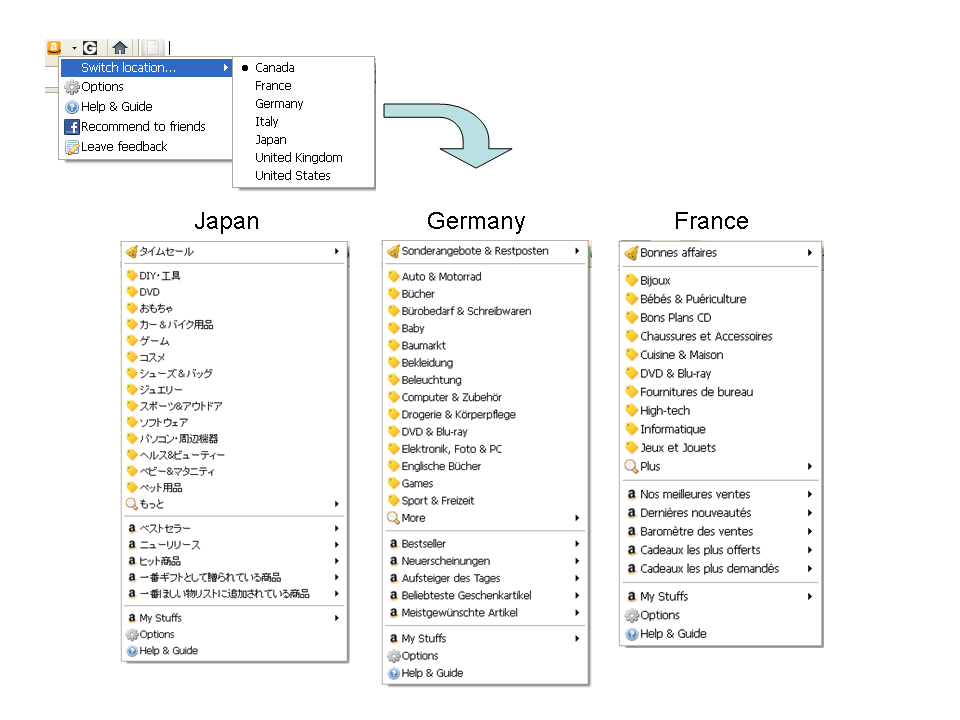
  • Amazon Japan discount links are now included

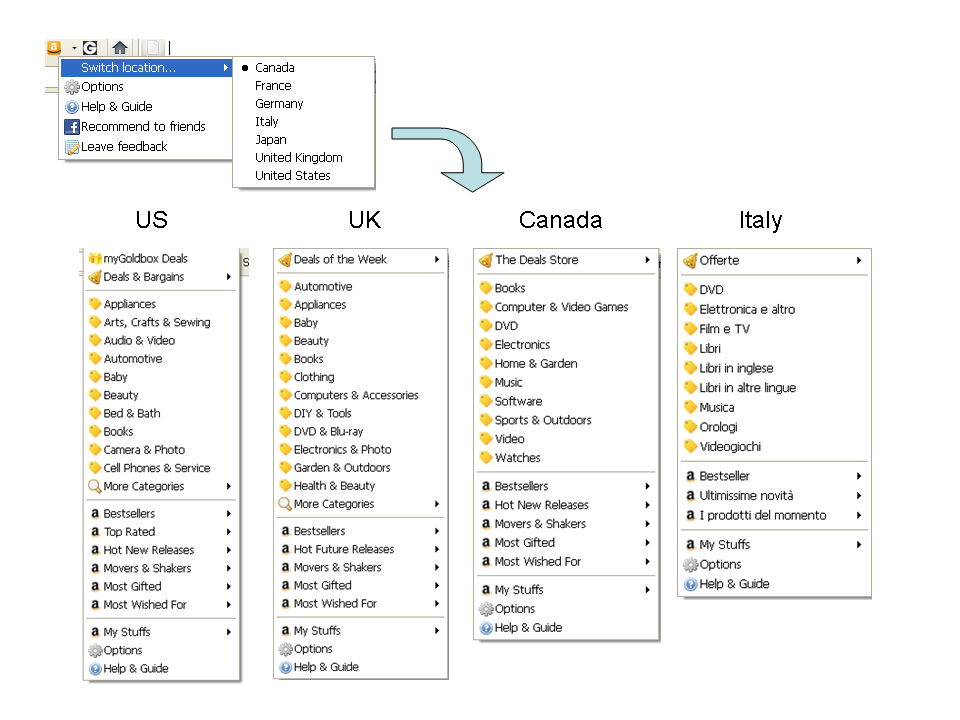
  • Amazon Italy deal and discount links are now included
  • Amazon US, UK, France and Germany’s deal and discount links are updated

  • More conveniently switch Amazon International Sites or change other options by right clicking on nav bar button and choose from the popup menu

Firefox Addon: Groupon Button version 1.0.20110331 released

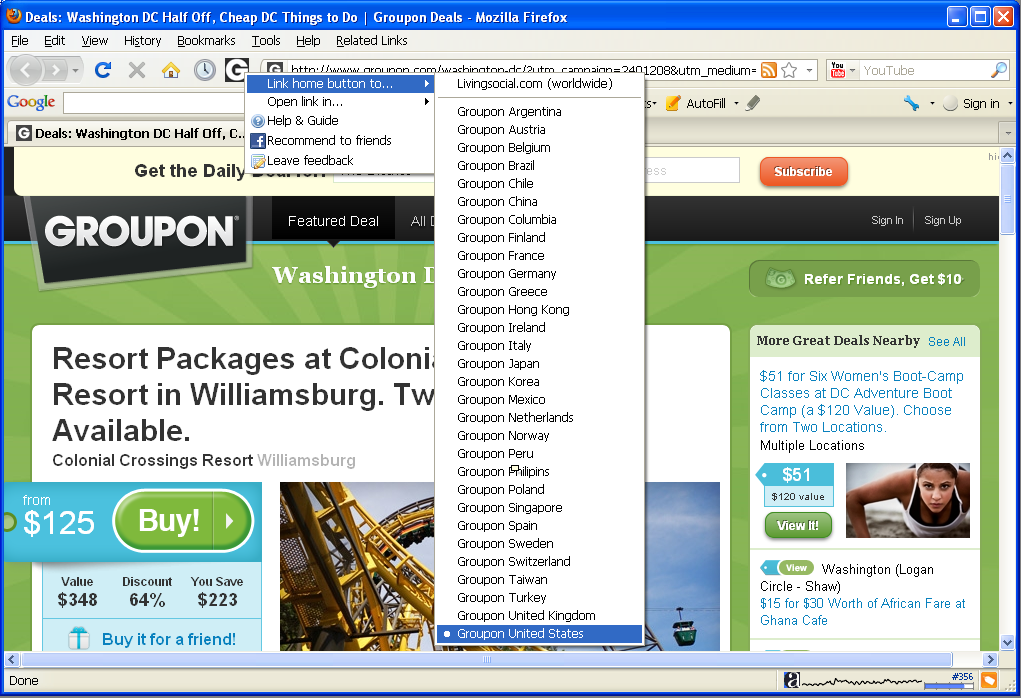
In this version, you may choose to link the button to either LivingSocial or any of Groupon international sites, in addition, youcan now choose to open link in new or current tab.  All of these features are available by right clicking on the button, and choose from popup menu, while it remains unchanged that left clicking on the button leads you to the Groupon (or LivingSocial) site conveniently.

Download Groupon Button from Firefox official addon site.  Check out the full manual of this addon.

Screenshots

Firefox Add-on: Groupon Button

We just released Groupon Button for Firefox, although it’s named after Groupon,  it actually supports both Groupon and LivingSocial, both are leading deal websites selling local business coupons online, serving  over 180 cities worldwide by offering a hand-picked heavily discounted local deal everyday to online shoppers.   This is the 1st Firefox add-on tools that brings online shopper much closer to Groupon and LivingSocial sites than before.

Features

These features are as of version 1.0.20110331 released on March 28, 2011.

Customize your button link to either Groupon or LivingSocial

Choose to link the button to either Groupon or LivingSocial by right clicking on the button and choose from the menu.  The Groupon sites include United States (including Canada cities), United Kingdom, France, Germany, etc.  We are not only the first Firefox add-on for Groupon, but also the add-on that covers complete list of Groupon country sites including China.  For a complete list, please see screen shots below:

Unlike Groupon who use different sites for different countries, LivingSocial covers multiple countries using one site.  Currently, it covers US, Canada, UK, Australia You may choose your button link to LivingSocial.com.

One click check out latest deals

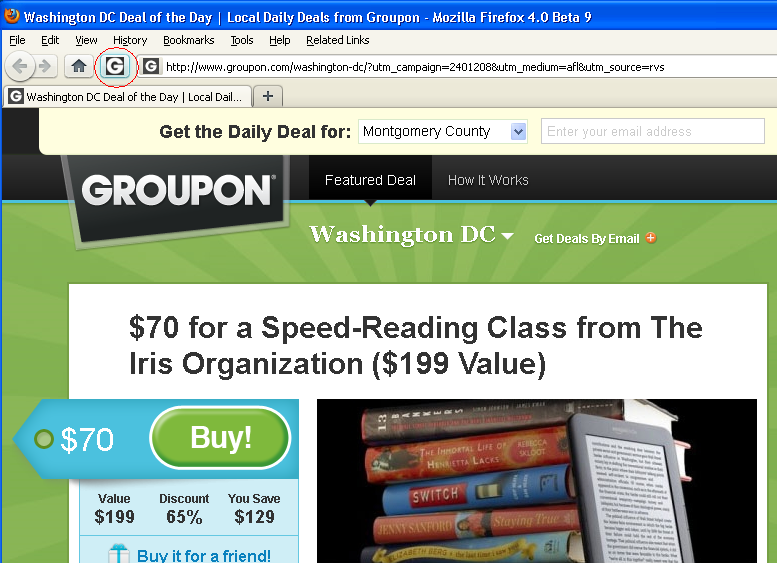
Clicking on Groupon Button on Firefox navigation bar leads you to Groupon or LivingSocial page of your customized city which shows today’s deals of your preferred local area.

Choose to open link in different locations

Right clicking on the button and choose from the “Open link in…” menu will allow you to choose to open links in a foreground new tab, a background new tab, or current tab.

Frequently Asked Questions

Why don’t you allow me to choose city?

Currently, both Groupon (all sites) and LivingSocial allows you to change your city preference on their site, that setting is automatically saved, therefore there is no need for Groupon Button to duplicate that effort.  After you choose a site to link to, you don’t need to bother to choose city using this addon, all you need to do is to make sure you chose the right city on Groupon or LivingSocial site, as both Groupon and LivingSocial site has the ability to remember your setting and will redirect to your previously chosen city page when you return.

Here are the steps of choosing city preference on Groupon/LivingSocial

  • Groupon: open drop down menu on the city name at top of the page, then change city.
  • LivingSocial: click on “more deals” on upper left area, then choose city.


Chrome Add-on: AmabayChrome – Compare Amazon and eBay Prices

AmabayChrome, (old link to app no longer working) allows you to use amabay.linked8.com to compare prices between Amazon and eBay for any product by one click.

How AmabayChrome Works

On Amazon.com, Amazon.co.uk, Amazon.de, and Amazon.co.jp sites, “Compare eBay Price” button appears on Amazon product search result and product detail pages, clicking on it leads to Amabay price comparison page for that product.

On ebay.com, ebay.co.uk, ebay.de, ebay.fr, ebay.ca, ebay.at, ebay.co.au, ebay.it, ebay.es, ebay.nl, and ebay.be sites, “Compare Amazon Price” button appears on eBay product search result and product detail pages, clicking on it leads to Amabay price comparison page for that product.

International Support

AmabayChrome works on Amazon US, UK, Japan, Germany sites and eBay US, UK, Germany, France, Canada, Austria, Australia, Italy, Spain, Netherlands, Switzerland, and Ireland sites. In most cases, regions are automatically detected.

Automatically detect region

When you click “Compare Price” button on eBay or Amazon pages, or bell button on address bar, region setting is automatically detected.

When regions are automatically detected, in most situations, Amazon and eBay prices in the same country will be compared, for example, if you click from Amazon.co.uk, you get result between Amazon.co.uk and eBay.co.uk. However, for a small number of countries, because they are not supported by eBay or Amazon, you’ll need to compare with other country’s results. These situations include:

  • click from amazon.co.jp, you get amazon.co.jp vs. ebay.com
  • click from ebay.ie, you get amazon.co.uk vs. ebay.ie
  • click from ebay.co.au, you get amazon.com vs. ebay.co.au
  • click from ebay.be, ebay. at, ebay.es, ebay.it, ebay.ch, or ebay.nl, you get amazon.de vs. these countries’ ebay results

Manually set region

When you click on AmaBay button on address bar to open AmaBay homepage, its default region is manually selected in option page.

Related Tools

Firefox version: AmabayFox (user manual)

Chrome Add-on: Amazon Extension for Google Chrome Version 1.2011.1.1 Released

This is a new version release note of Amazon Extension for Google Chrome. (This version is available to download now)
For a complete user manual of this add-on, please visit here.

As mentioned when this addon was first released, we are adding support to more countries in this new version, as of now, the addon supports the following Amazon sites:

  • United States
  • United Kingdom
  • Germany
  • France
  • Canada

Amazon France and Germany support was added in this version.

Firefox Add-on: Amazon Deal Button version 1.2.20101231 Released

Amazon Deal ButtonThis is a new version release note of Amazon Deal Button. (this version will be available to download soon)
View a complete user manual of this add-on.

The latest version of Amazon Deal Button features the following improvements:

  • Compatible with Firefox 4
  • Sort discounted products by customer review, best sellers, price and release dates.  You can change this setting in Options.  Default sort option is by customer review.
  • Added Top Rated section for Amazon US.  In addition to Bestsellers, Movers and Shakers, Hot New Releases, Most Gifted and Most Wished For sections, Amazon US recently launched a new section called Top Rated which allows online shoppers to browse products by customer reviews and by categories.  The products with the overall highest customer review among biggest customer population are ranked highest.
  • Updated deal links for Amazon US, UK and Germany.  Since last version was released about 4 months ago, a few changes have happened to Amazon US, UK and Germany site structure, these changes are reflected.
  • Search highlighted keywords using Amabay and compare Amazon and eBay prices based on your country setting.  For example, if your Amazon Deal Button country is set to UK, you will see Amazon.co.uk and eBay.co.uk price comparison results.
  • Look and Feel.  The menu item icons are now changed to a uniform yellow post-it icon instead of English letters used in previous versions.

Caveats related to sort by settings:

  • Sort by setting only applies to discounted products section
  • Sort by release date option is not available to all product categories, for example, DIY & Tools in Amazon UK