Category Archives: Firefox Add-ons

Firefox Add-on: Amazon Deal Button version 1.2.20101231 Released

Amazon Deal ButtonThis is a new version release note of Amazon Deal Button. (this version will be available to download soon)

View a complete user manual of this add-on.

The latest version of Amazon Deal Button features the following improvements:

  • Compatible with Firefox 4
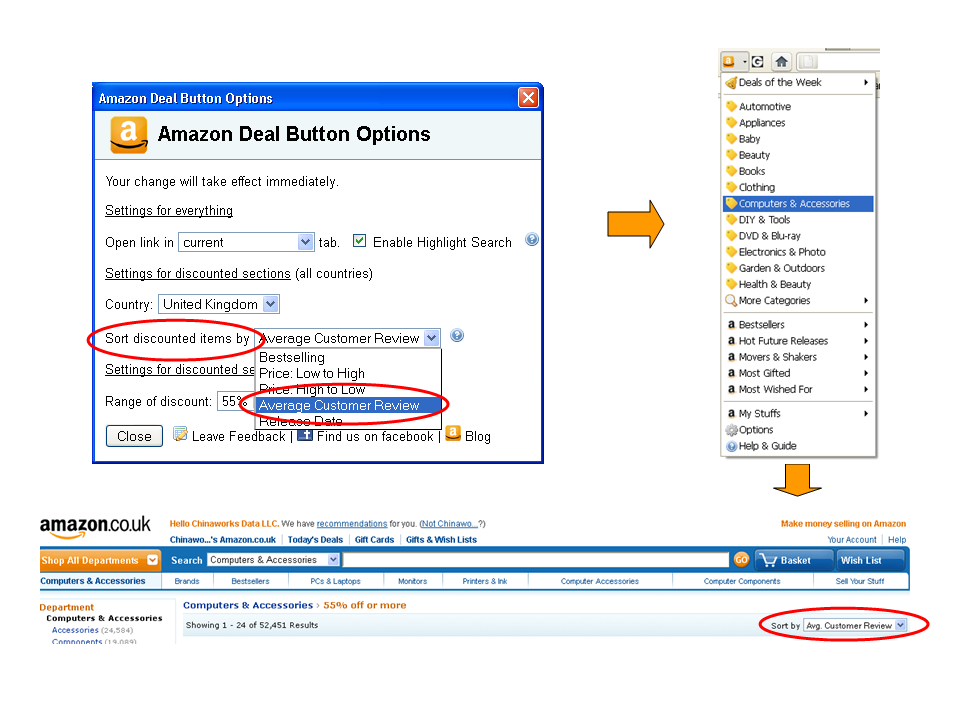
  • Sort discounted products by customer review, best sellers, price and release dates.  You can change this setting in Options.  Default sort option is by customer review.
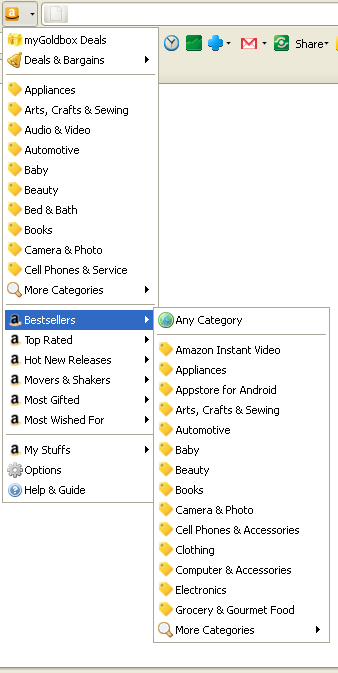
  • Added Top Rated section for Amazon US.  In addition to Bestsellers, Movers and Shakers, Hot New Releases, Most Gifted and Most Wished For sections, Amazon US recently launched a new section called Top Rated which allows online shoppers to browse products by customer reviews and by categories.  The products with the overall highest customer review among biggest customer population are ranked highest.
  • Updated deal links for Amazon US, UK and Germany.  Since last version was released about 4 months ago, a few changes have happened to Amazon US, UK and Germany site structure, these changes are reflected.
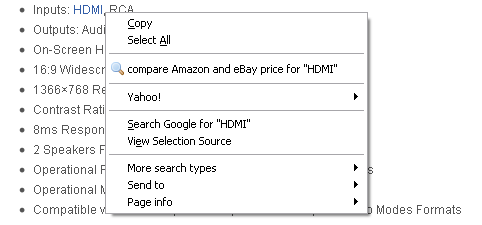
  • Search highlighted keywords using Amabay and compare Amazon and eBay prices based on your country setting.  For example, if your Amazon Deal Button country is set to UK, you will see Amazon.co.uk and eBay.co.uk price comparison results.
  • Look and Feel.  The menu item icons are now changed to a uniform yellow post-it icon instead of English letters used in previous versions.

Caveats related to sort by settings:

  • Sort by setting only applies to discounted products section
  • Sort by release date option is not available to all product categories, for example, DIY & Tools in Amazon UK

Firefox Add-on: Credit Card Fox version 1.0.20101231 Released

This is a new version release note of Credit Card Fox. (this version will be available to download soon)

View a complete user manual of this addon.

Credit Card Fox version 1.0.20101231 was just released.  The major improvement in this version was to be compatible with Firefox 4 which will be released soon in early 2011.

If you have something to say about this add-on, please leave your feedback here.

Firefox Addon: AmabayFox New Version 1.2.20101231 Released

iconThis is a new version release note of AmabayFox. (this version is available to download)

View a complete user manual of this addon.

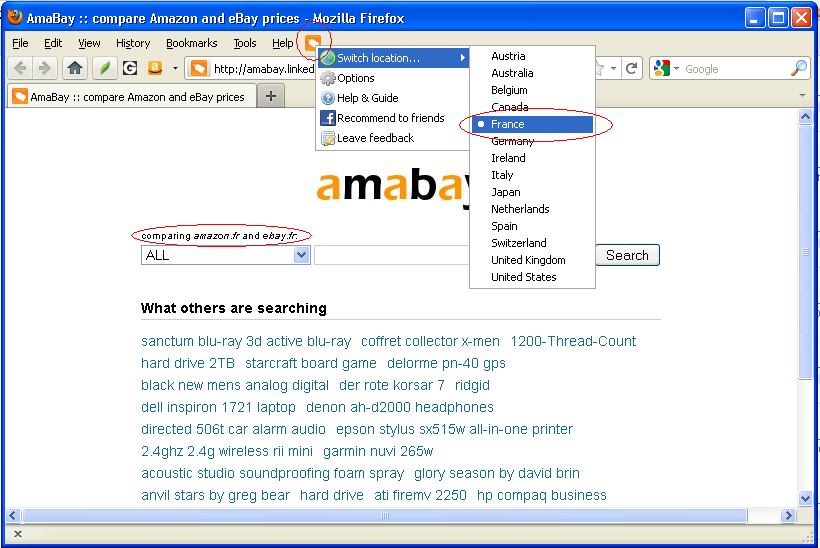
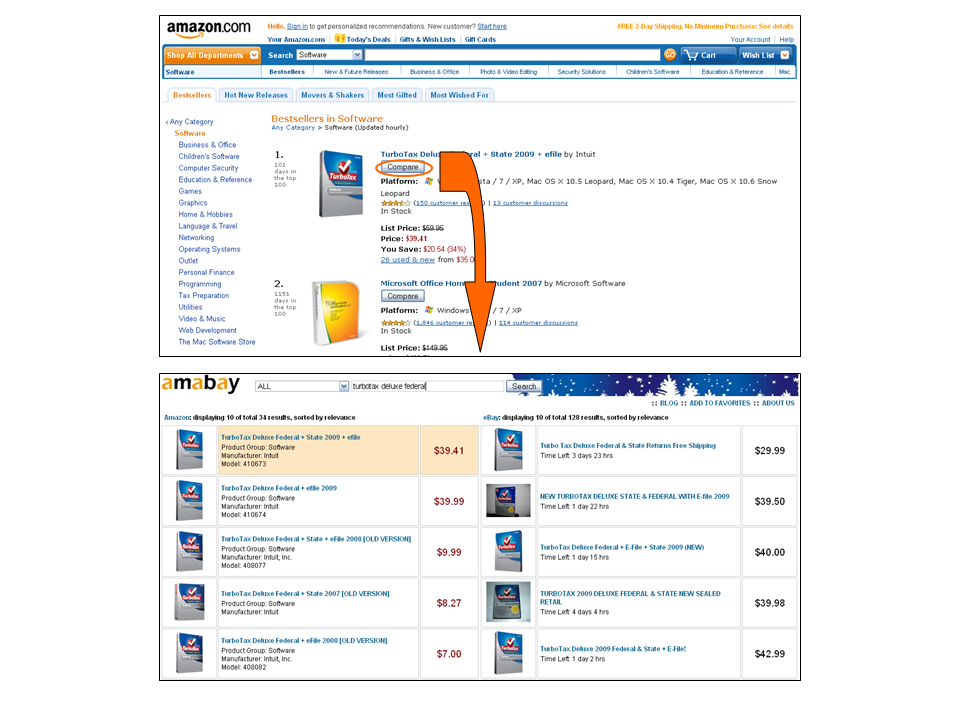
We’ve released a new version of AmabayFox, the major improvement was to support Amazon and eBay international sites.   Amazon US, UK, Japan, Germany sites and eBay US, UK, Germany, France, Canada, Austria, Australia, Italy, Spain etc. sites are now supported, now you may compare Amazon and eBay prices from all the above country websites.

We try to compare prices between Amazon and eBay in the same country, and it’s true for most countries for example, if you click from Amazon.co.uk, you get result between Amazon.co.uk and eBay.co.uk.  For a small number of other countries, because  they are not supported by eBay or Amazon, you’ll need to compare with another country’s results. These situations include:

  • click from amazon.co.jp, you get amazon.co.jp vs. ebay.com
  • click from ebay.ie,  you get amazon.co.uk vs. ebay.ie
  • click from ebay.co.au, you get amazon.com vs. ebay.co.au
  • click from ebay.be, ebay. at, ebay.es, ebay.it, ebay.ch, or ebay.nl,  you get amazon.de vs. these countries’ ebay results

Firefox Addon: AmabayFox New Version 1.1.20101031 Released

iconThis is a new version release note of AmabayFox. (this version will be available to download soon)

View a complete user manual of this addon.

We’ve released a new version of AmabayFox, the major improvement was to include eBay US site.

New features include:

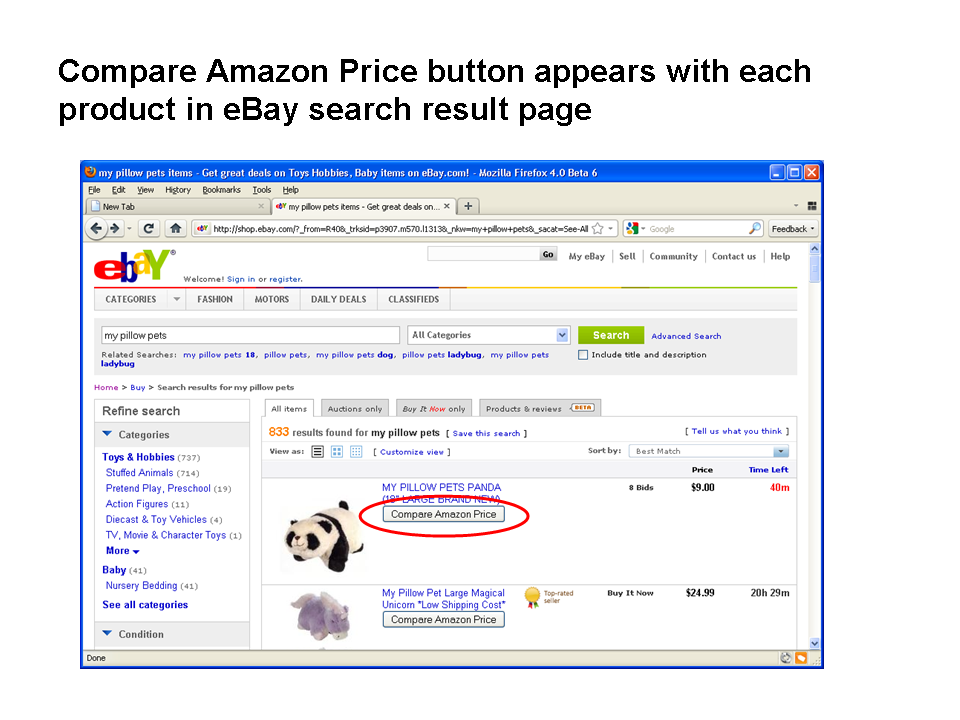
Now you can compare Amazon price by clicking on a button on search result or product detail pages, the button is unobtrusively placed by AmabayFox.  Currently it only works with eBay US site.

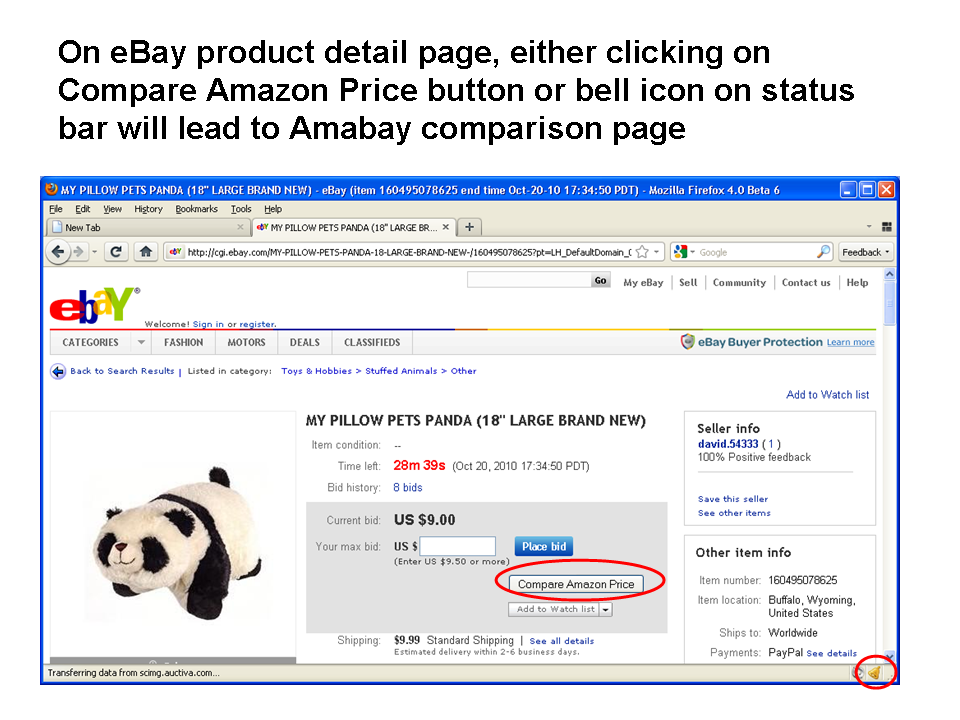
Status bar icon added, clicking on it will lead to Amabay result:

  • At any Amazon or eBay product detail page, status bar icon will change to a “bell”, clicking on it will lead to price comparison results.
  • At any other web pages, the status bar icon remains a “shopping bag”, clicking on it leads to Amabay homepage.

Firefox Addon: Credit Card Fox

Credit Card FoxWe just released Credit Card Fox (temporarily unavailable as we are working on partnerships), a Firefox toolbar button addon.  Credit Card Fox aggregates and presents latest credit card offers and helps online shoppers find card offers best fit their needs.   Currently this addon covers US, UK and Canada credit card offers.

Features

Multiple ways of finding your favorite credit cards. US based users could choose from one of three ways for this addon to present credit card offers:

  • By card types
  • By credit quality
  • By bank or issuer

UK and Canada are supported. For UK and Canada residents, only the issuer option is available as of this very first release.

Credit Card Offer Details viewable in menu. When users put mouse on a credit card offer in menu, detailed information including benefits in bullet points, credit required, annual fee will show up in a popup tag window.

Customize Button Destination.  User can customize the destination of the “main button” itself,  the default destination is credit-land.com.

Customize Link Open Styles.  User can customize whether the link open in current tab or a new tab.

If your browser is not Firefox, don’t worry, check out the Credit Card Fox web version

Frequently Asked Questions

Q. How does the Credit Card Fox make sure the information are up to date?

A. Credit Card Fox use RSS feeds to get real time credit card offer information, therefore as long as our feeds are up to date, the information you receive is up to date.

Q. How often does credit card information get updated?

A. We update credit card information weekly, so that expired credit cards are removed from the listing, while new credit cards will appear in your add-on tool.

Image Gallery

by issuer


Awards

As of January 2011, Credit Card Fox was granted top rated and most popular Firefox Shopping Add-ons with other 48 add-ons.

Firefox Addon: Amazon Deal Button 1.2.20100820 Version Released

This is a new version release note of Amazon Deal Button. (this version will be available to download soon)

For a complete user manual of this add-on, please visit here.

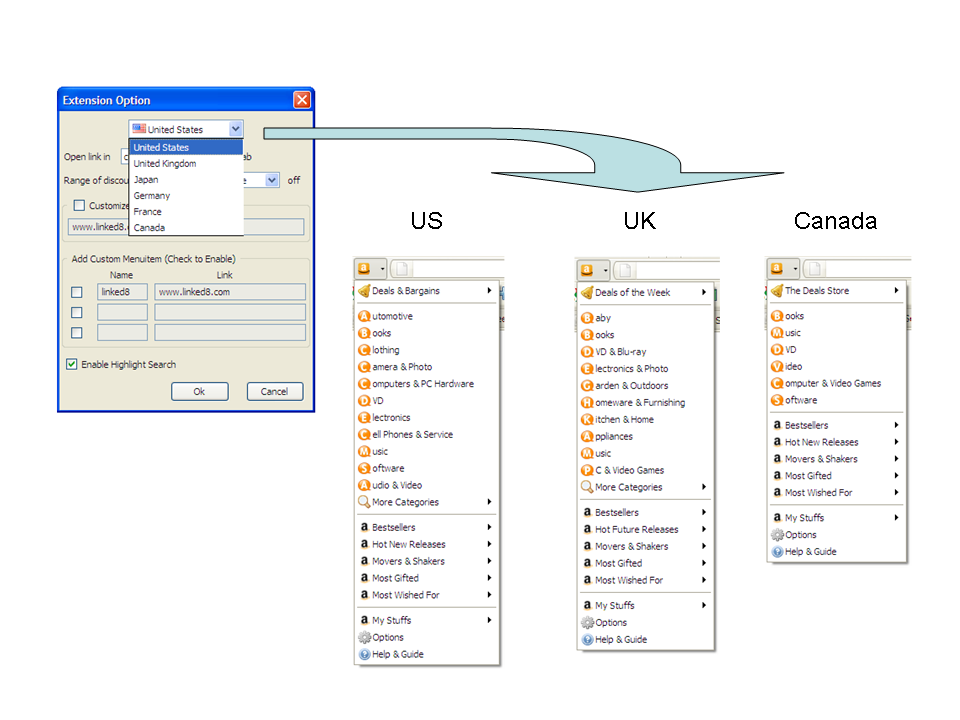
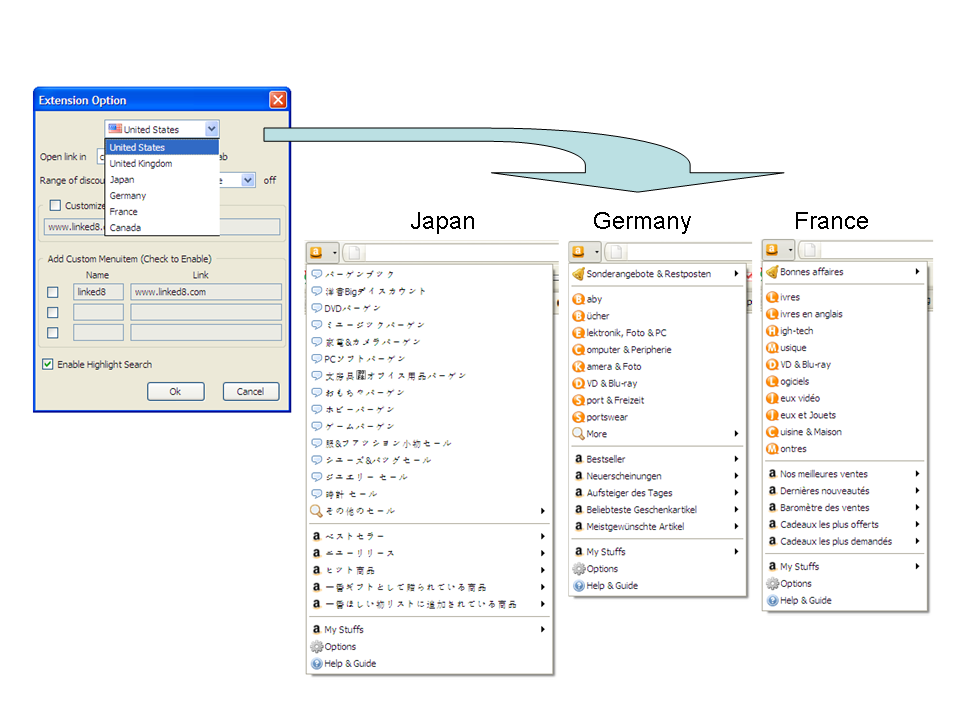
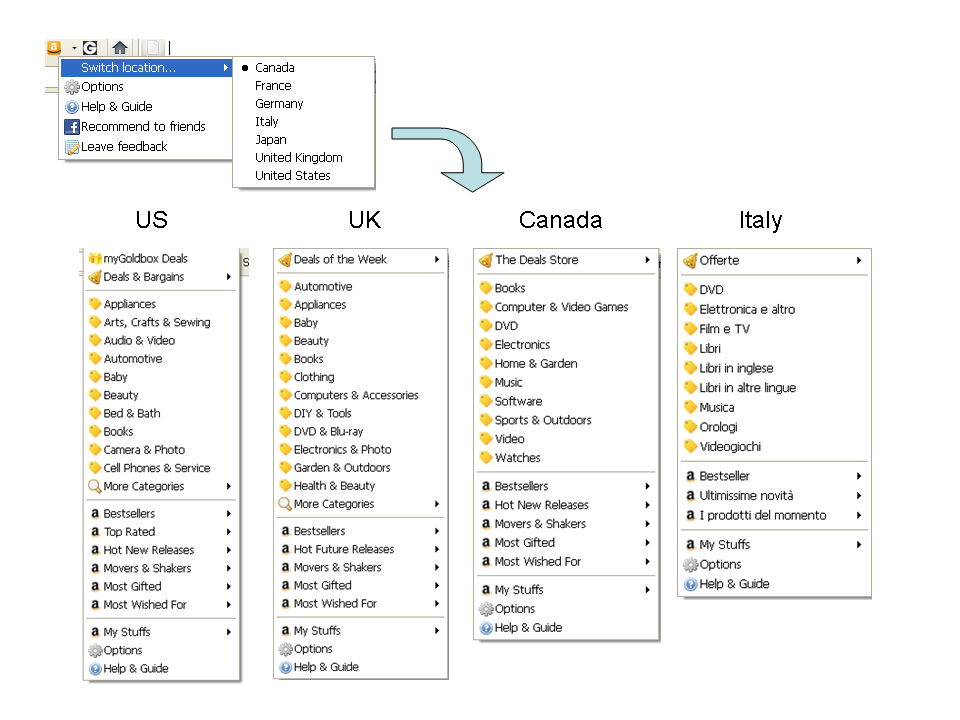
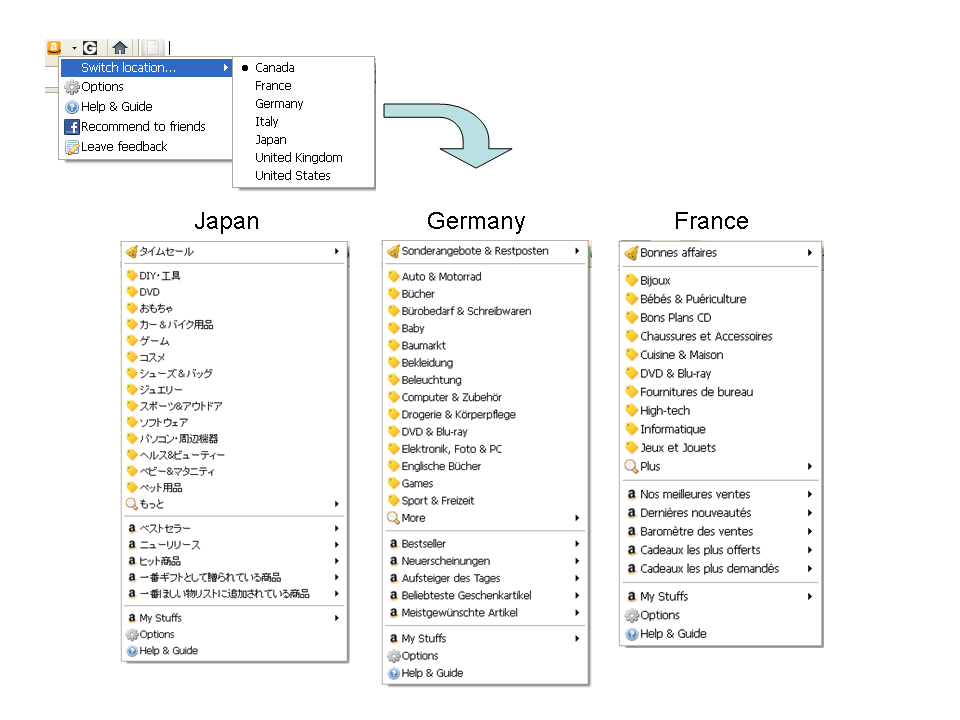
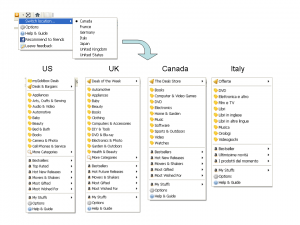
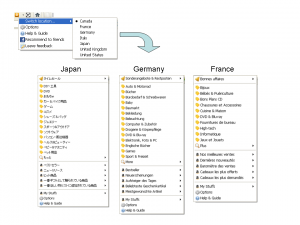
FFAmznSaleWe are continuously making the Amazon Deal Button better by adding new features and catering to bigger audience.  In this latest version release, we expanded Amazon Deal Button’s geographic coverage by adding four countries: Japan, Germany, France and Canada.

Here are how menu look like for US, UK and Canada users

US UK CA

Here are how menu look like for Germany, Japan and France users

JP DE FR

Firefox Addon: Amazon Deal Button 1.1.20100502 Version Released

FFAmznSaleAfter the first version of Amazon Deal Button was released, we received a couple of suggestions.  One of them was to simplify menu items and to allow users to customize discount percentage ranges.

That’s a really good point and we did achieve that in this new version.   In summary, major changes made in this new version are:

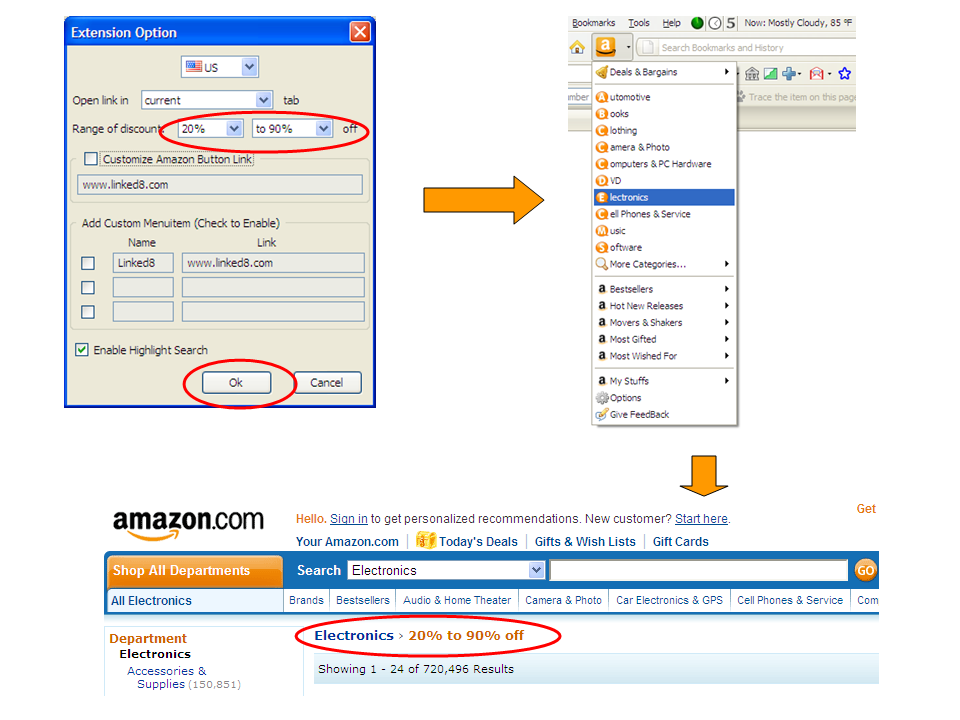
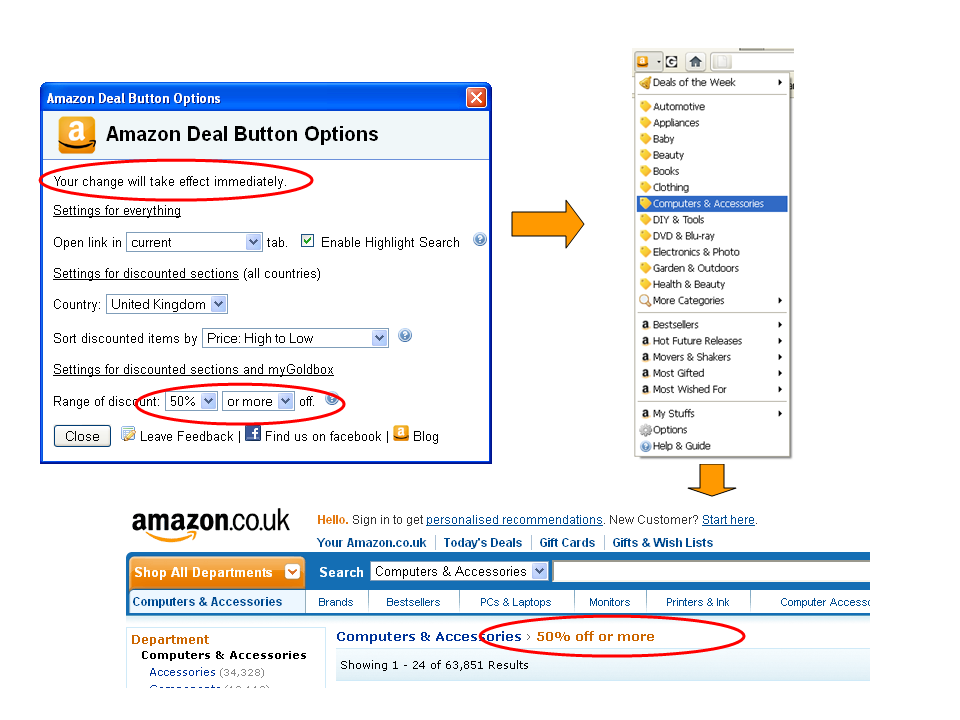
  • Choose your own range of discount percentage for any product categories on Amazon US and UK sites. For example, you can choose 20% or more as your preferred discount range, thereafter all your clicks on discount links will lead you to see products 20% off or more on Amazon. You may change this setting any time and get desired discount percentage range immediately.
  • Bug Fix: when you use Small Icons options when you customize Firefox Toolbar, size of Amazon Deal Button will adjust accordingly.

The following flow chart (click to enlarge) shows how easy it is to customize range of discount percentages.

customizable discount

Firefox Addon: AmabayFox – One Click Compare Amazon and eBay Prices

AmabayFox allows you to compare eBay price from Amazon sites and compare Amazon price from eBay sites by single click while you surf either site,  so that you can find the best deal available right now.  AmabayFox works on Amazon US, UK, Japan, Germany sites and eBay US, UK, Germany, France, Canada, Austria, Australia, Italy, Spain, Ireland, Netherlands, and Switzerland sites.

DOWNLOAD AmabayFox at Firefox Addon website.

Where to find AmabayFox

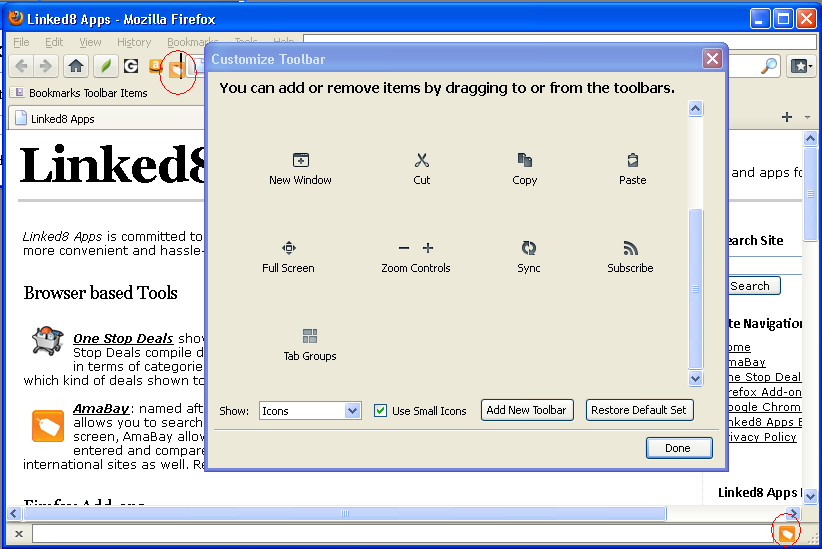
AmabayFox button (the orange button)

  • AmabayFox button shows up on Firefox browser after install. You may place the button wherever you want. (see screenshot above)
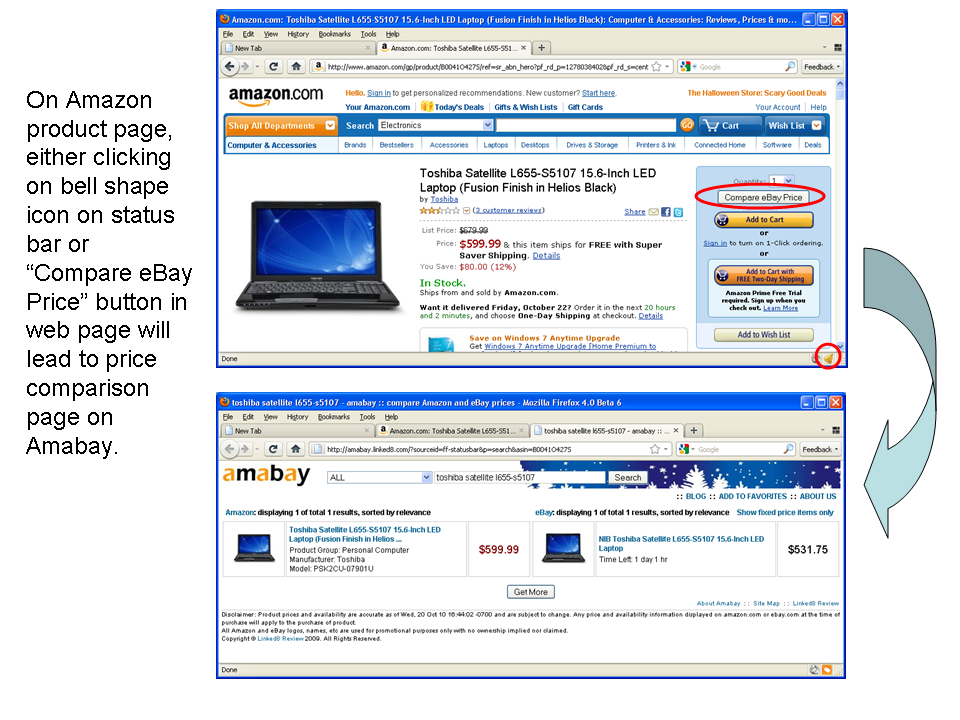
  • On Amazon or eBay product detail page, the button changes to bell shape, clicking on it leads you directly Amabay price comparison page for this product.
  • On any other web pages, the button is a shopping bag icon, clicking on it leads you to Amabay home page. The Amabay home page’s locale can be configured.

Amazon and eBay sites

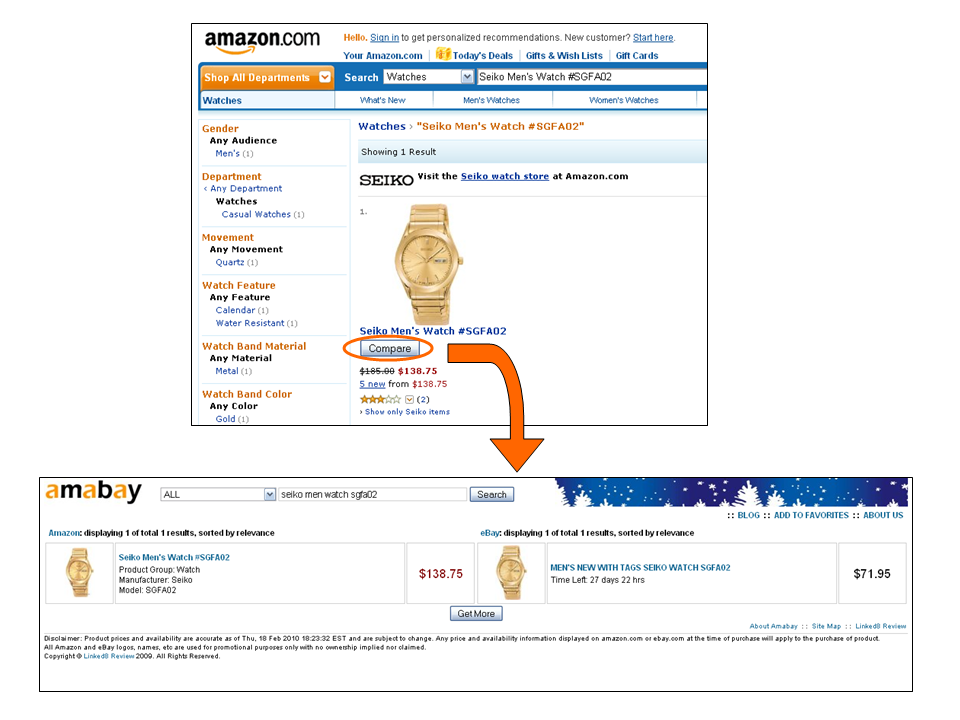
  • On Amazon.com, Amazon.co.uk, Amazon.de, and Amazon.co.jp sites, “Compare eBay Price” button appears on Amazon product search result and product detail pages, clicking on it leads to Amabay price comparison page for that product.
  • On ebay.com, ebay.co.uk, ebay.de, ebay.fr, ebay.ca, ebay.at, ebay.co.au, ebay.it, ebay.es, ebay.nl, and ebay.be sites, “Compare Amazon Price” button appears on eBay product search result and product detail pages, clicking on it leads to Amabay price comparison page for that product.

International Support

AmabayFox works on Amazon US, UK, Japan, Germany sites and eBay US, UK, Germany, France, Canada, Austria, Australia, Italy, Spain, Netherlands, Switzerland, and Ireland sites.

In most cases, Amazon and eBay prices in the same country will be compared, for example, if you click from Amazon.co.uk, you get result between Amazon.co.uk and eBay.co.uk. However, for a small number of countries, because they are not supported by eBay or Amazon, you’ll need to compare with other country’s results. These situations include:

  • click from amazon.co.jp, you get amazon.co.jp vs. ebay.com
  • click from ebay.ie,  you get amazon.co.uk vs. ebay.ie
  • click from ebay.co.au, you get amazon.com vs. ebay.co.au
  • click from ebay.be, ebay. at, ebay.es, ebay.it, ebay.ch, or ebay.nl,  you get amazon.de vs. these countries’ ebay results

Screenshot Gallery

Slide5

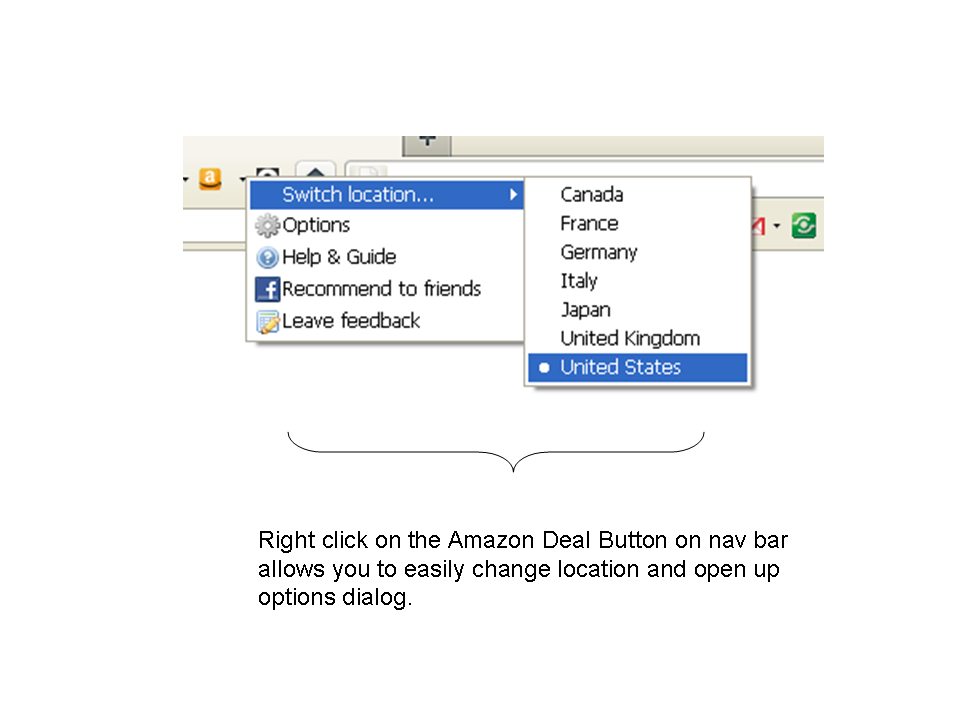
By default, clicking on the shopping tag icon leads to Amabay home page.  You may change the homepage’s default locale by right clicking on button, then choose locale in Switch location menu

Slide6Slide7

AmabayFox1AmabayFox2

You may place AmabayFox button wherever you want on Firefox browser

Addon Description

Are you a fan of Amazon or eBay, or are you just a fan of good products at lowest price? No matter which type you fit in, AmabayFox allows you to search both Amazon and eBay for a product and compare prices between these two online shops side by side to find best deals.

In addition to that, unlike other price comparison Firefox Addons which force you to choose your keyword by either typing or highlighting, AmabayFox places a down-to-earth Compare button beside the product you are browsing on online shop website (currently Amazon, more shops to be added), all you need is one click on the button, and there you go with Amazon and eBay prices side by side displayed in front of you.

There is no permanent toolbar or button on your browser that comes with AmabayFox, since the AmabayFox button only shows up when you are on product web page.

Awards

AmabayFox downloadIn December 2010, AmabayFox Firefox add-on was granted the “Editor’s Pick Award” by FamousWhy.com.

Firefox Add-on: Amazon Deal Button

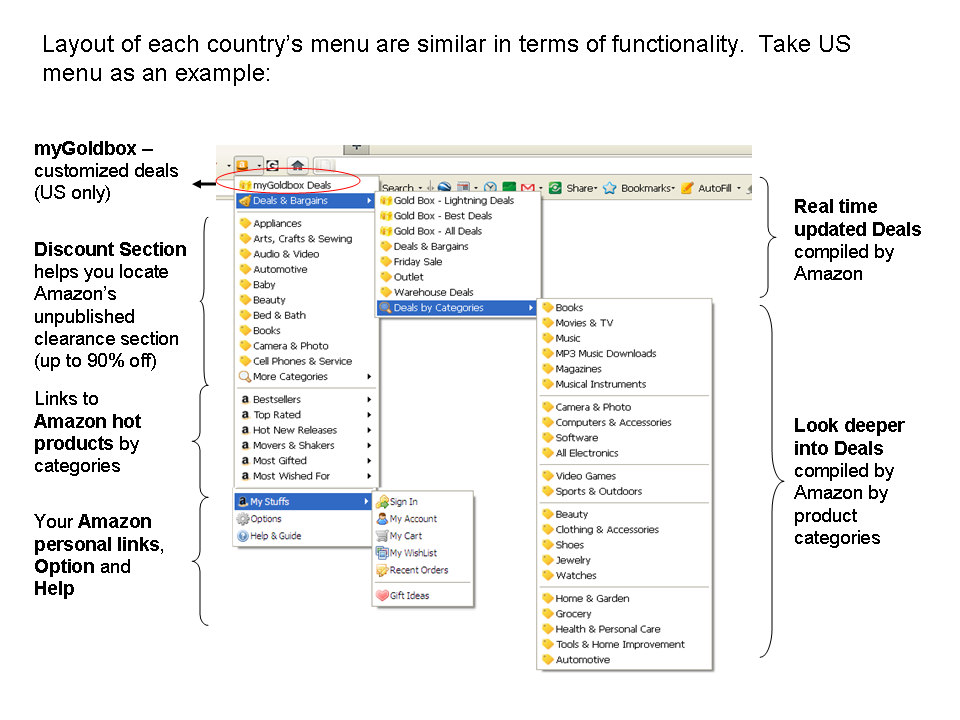
Navigate through Amazon’s Deals & Bargain sections and uncover the secret clearance sections with a button just few clicks away.   Keep updated with latest Amazon US Gold Box deals using personalized settings from myGoldBox.  Browse up to 90% off products in 20+ categories on Amazon US site and all international sites (UK, Germany, Japan, France, Italy and Canada).  Browse all categories of Amazon’s Deals and Bargains, Bestsellers, Movers and Shakers, Hot New Releases, Most Gifted, and Most Wished For items.   What’s more, highlight any keyword when you surf the web, then one click away you can compare Amazon and eBay price using that keyword.

DOWNLOAD Amazon Deal Button at Firefox Add-on Website.

Features

* All Amazon international sites supported, including amazon.com (US), amazon.co.uk (UK), amazon.co.jp (Japan), amazon.de (Germany), amazon.fr (France), amazon.ca (Canada), amazon.it (Italy)
* Easily navigate through Amazon most frequently updated deal sections including Deals & Bargains, Gold Box, Warehouse Deals, Outlet, and Friday Sales etc.
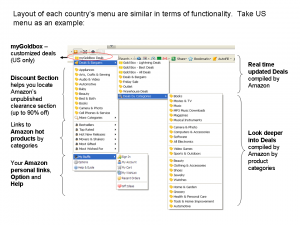
* Easily navigate Amazon clearance section by categories and by discount percentage ranges set by yourself.  For Amazon US shoppers, the discount range setting here will be also applied to myGoldBox when you check out personalized GoldBox deals.
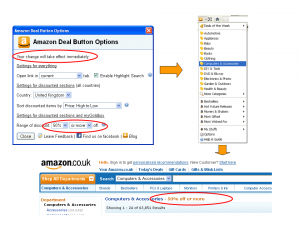
Customizable sort order of how Amazon clearance products are listed, default option is Average Customer Review (from high to low).
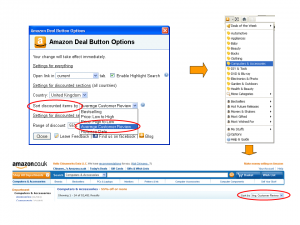
* Easily change country and other settings by right click on the nav bar button.
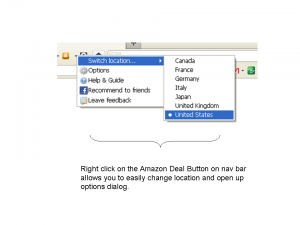
* Easily navigate to Amazon popular destinations such as My Account, Sign In, My Cart etc.

* Compare Amazon and eBay price using context menu
— In the browser, highlight any text, right click, and choose “compare Amazon and eBay price for ….”

context menu

* Browse Bestsellers/Movers and Shakers/Hot New Releases/Most Wished For/Most Gifted items
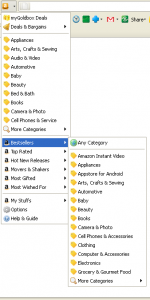
Browse all Amazon categories of
— Bestsellers
— Hot New Releases
— Movers and Shakers
— Most Gifted Items
— Most Wished For Items
— Top Rated (US only)


Developer Comments

If you have any feedback or comments, please spend a few minutes by filling out the form here.

NOTE: Amazon Discount Button is supported by Amazon’s Affiliate program, without which we would not be able to afford to provide it.

Courtesy to  Shopholic from Firefox Add-ons and Yan Bezugliy‘s terrific blog ProBargainHunter.

User Manual

Settings

Discount range: Set your preferred discount range here, this setting applies to both Amazon Discounted Section and Amazon Customized Goldbox Deals (US only) service from One Stop Deals.   After you set the minimum and maximum discount range, only those products whose prices are discounted in that range will be shown when you click on either Amazon Discounted Section or Amazon Customized Goldbox Deals link.

Customized Goldbox Deals (from One Stop Deals): this service allows you to set a customized filter to a wide range of Amazon Goldbox deals so as to focus on the deals you need.  The personalized filter includes product category, expire date, keyword etc.   This service currently only supports Amazon US.

Sort by: Amazon Discounted Section (for all countries) will display products in one of the following orders:

  • Bestselling
  • Price: Low to High
  • Price: High to Low
  • Average Customer Review (default)
  • Release Date

Highlight search: Check the box, then you can highlight any word in browser, right click, then choose to search Amazon and eBay at the same time and compare price.  This service works for all countries including US, UK, Germany, France, Japan, Italy and Canada, for example, if you are using Amazon France site, then you will automatically compare Amazon.fr and eBay.fr price for the highlighted keyword.