Recently read an article about Steve Jobs being involved with developing the iPhone model that is to be rolled out after iPhone 4S. Although the AI application SIRI is a feature in iPhone 4S, the article still speculated Steve Jobs’ involvement with that feature, as SIRI’s technology is consistent with Steve’s philosophy of product design: “simple to use technology that seemingly brings magic to human’s life”. I am not an apple fan, actually I own no apple product myself, but I do acknowledge that Steve Jobs is the beacon of designing consumer products, and that piece of his philosophy will keep on inspiring more geniuses in the future.
All posts by 布雷
B2C vs C2C market comparison over 10 years
AMZN and EBAY are both eCommerce platforms which sell products online, however EBAY does not manage any warehouses because it operates the platforms only, its major challenge is to ensure the quality of products listed there and help establish a credit system for sellers, while AMZN manages huge warehouses as AMZN itself is the biggest seller on its own platform, quality of the products and the credit of seller is lesser problem for AMZN, its major challenge is to manage the cost of inventory and warehouses and deliveries.
Using market cap of AMZN and EBAY as proxy for Business To Consumer (B2C) and Consumer TO Consumer (C2C) market, this is an interesting chart of their dynamics over last 10 years. It shows that at the early Internet years, C2C market is bigger and peaked first, while B2C market catch up later on and exploded in exponential rate a few years after C2C market’s peak. EBAY or platform only model has an early and fast win because it quickly reaches wide variety of products, while in early days, the fact that number of sellers is small ensures a balance between quality and profit for sellers. However, as more and more sellers enters the market, competetion becomes more intensive, it becomes harder and harder to maintain high profit margin for high quality sellers on C2C marketplace, so those sellers and their products leave the market, leaving the low quality sellers who sell fake products which will turn away consumers. While in B2C model, quality is guaranteed as AMZN itself is seller. This chart reflects that over long term, quality of products at reasonable prices are what attract and keep bringing back consumers to a marketplace.

Machine Problem Solving: Watson’s Approach
This is how IBM is using computer models to create an inference engine that has problem-solving capabilities:
“What’s really going on under the hood is that Watson is taking input, generating hypotheses, and trying to prove them based on what it thinks it has understood about the clue, the category, even the surrounding clues. For each possible answer, Watson tries to find all the material that supports or refutes that answer. Then it analyzes that evidence to come up with a set of the best answers. That’s exactly what you do when you try to solve a problem, whether it’s differential diagnoses in medicine or a technical-support question or financial analysis; you look for the conditions in which a particular situation might occur. What the computer is helping you do is organize all that evidence for the possible answers — the possible diagnoses — from a huge amount of content.”
-David Ferrucci, Principal Investigator – Watson Project
Firefox Addon: AmabayFox New Version 1.3.20110630 Released

 This is a new version release note of AmabayFox. (this version is available to download soon)
View a complete user manual of this addon.
In this new version of AmabayFox, Firefox Browser Addon, here are the new features:
- You may now place the AmabayFox button wherever you like, the locations you can choose from include menu bar, navigation bar or add-on bar. By default, after install, AmabayFox button will be placed on navigation bar, after that, you may change its location by doing the following:
- Right click on any Firefox browser bar area, click “Customize”
- After Customize Toolbar window popup, use your mouse drag and drop the button to the bar you want
- Close Customize Toolbar window, all set!
- You may now configure the default locale of Amabay homepage by one of the following ways:
- Right click on AmabayFox button, choose from “Switch location” menu
- Right click on AmabayFox button, click “Options”
If you are using this tool and have feature request, please fill out form here.
AmaBay new features: region support, new look and more…
 We felt that AmaBay need some major face lift, so we renovated the site and added a couple of new features:
First of all, we combined ebay and amazon regions into one, user will be able to choose once instead of twice. Here is some background of this issue: even though eBay and Amazon are both global eCommerce companies, they support different countries, with eBay supports more while Amazon supports less, the countries where Amazon has presence all have eBay presence except Japan, while a couple of eBay present countries do not have Amazon presence, for example, Austria, Australia, Belgium, Ireland, etc… For this reason, we initially kept country selector for eBay and Amazon separate. Now we are merging them together because it’s what user needed, we should do what’s easier for user, not what’s easier for us.
Secondly, we made the search result page cleaner. We removed a couple of notes for each product, Product Group, Manufacturer under Amazon, Time Left under eBay. Now these notes can be seen in tooltip window when you move mouse over images. After this change, the result page only displays product images, title and prices, because these are what visitors really care about.
Lastly, we are making the mouse over tooltip image larger and clickable. Right now, only the Amazon side of results have large images added to tooltip window, we are still working on eBay side, but the pictures on both sides are already clickable, clicking on it will lead to product detail page on eBay or Amazon. On Amazon side, try moving your mouse over any product images, you will see large image of this product with great details. I don’t know what you think, but I am very visually driven when I do shopping, so with large pictures viewable, it’s more likely that I will buy the product.
Please feel free to leave your feedback or request for features to info@linked8.com
June 18, 2011 Update: after AmaBay region feature change, Firefox Addon AmabayFox 1.2.20110115 users will experience a bug when they compare price from Amazon or eBay non-US site, the result page will always use US as region. Now this bug has been fixed. Sorry about the inconvenience.
Chrome Extension: AmabayChrome version 1.2011.5.29 released
 This is a new version release note of AmabayChrome which enables one click compare Amazon and eBay prices from Google Chrome browser.
About 4 months after the release of 1st version, this 2nd version release is packed with exciting new features which will bring more convenience to your online shopping experience. The new features added to this version are:
- “Compare Price” button location now configurable. Responding to needs from one of our users, now users can configure whether “Compare Price” buttons are displayed on Amazon / eBay search result pages. By default, “Compare Price” buttons are shown on Amazon / eBay search result pages, but users can now turn that off in options page. Please note, “Compare Price” button will always show up in Amazon / eBay product detail pages, this setting could not be changed.
- Address bar button provides yet another way to click once to compare price. The button will selectively show up on right side of your address bar based on your current page and setting:
- When you are viewing a product’s page on eBay or Amazon, the product information will be automatically detected, and a bell shaped button
 will show up, clicking on it will show you AmaBay price comparison result for this product in a new tab.
 - When you are viewing other eBay or Amazon pages, the button’s shape will change to , clicking on it will lead you to the AmaBay homepage of your selected country. You may change the country setting in Options page. If you like this button so much that you want it to show up more often, you have the choice of make it appear when you view any pages on Internet, that setting can be changed in Options page.
- When you are viewing a product’s page on eBay or Amazon, the product information will be automatically detected, and a bell shaped button
For complete user manual of this extension, please visit here.
Firefox Add-on: Amazon Deal Button version 1.3.20110420 Released

 This is a new version release note of Amazon Deal Button. (this version will be available to download soon)
View a complete user manual of this add-on.
Important: This version is compatible up to Firefox 9.* ONLY, if you use Firefox 10.* or higher, please download Amazon Deal Button version 1.4.20120210, which can be found here.
The change made to the latest version of Amazon Deal Button are:
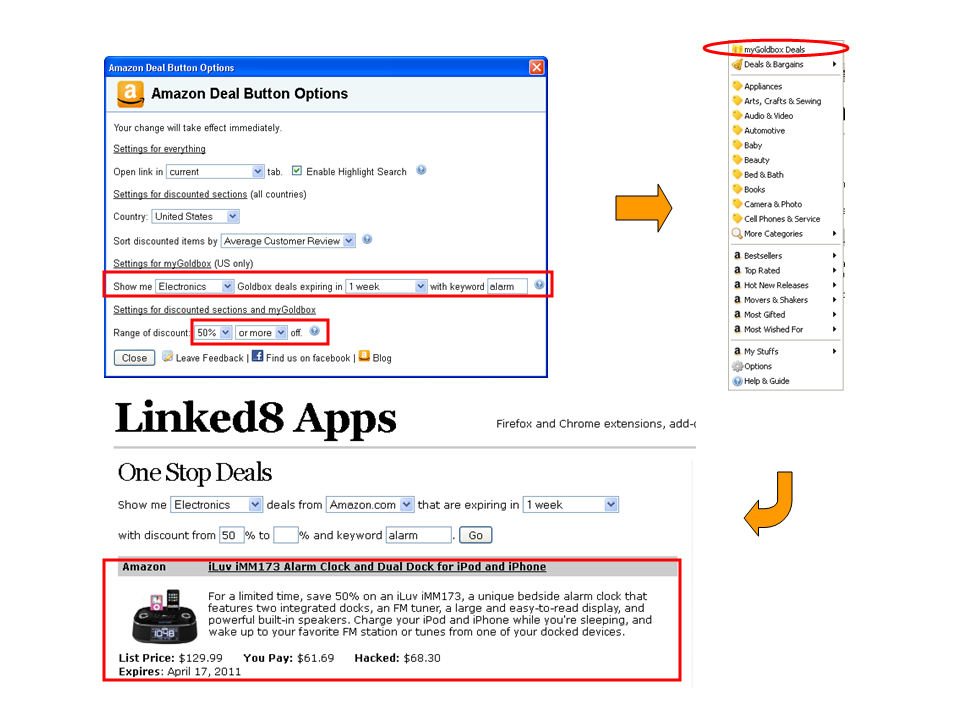
- myGoldBox (US only), where your can check out personalized Amazon Gold Box deals based on your preference of category, discount range, expire date and keywords.
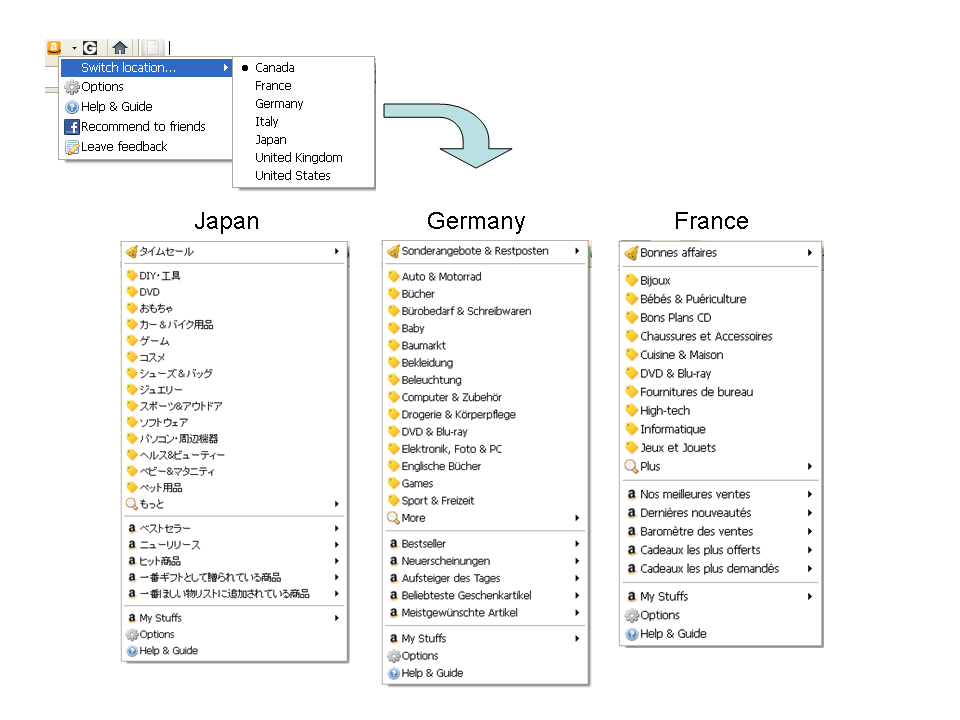
- Amazon Japan discount links are now included
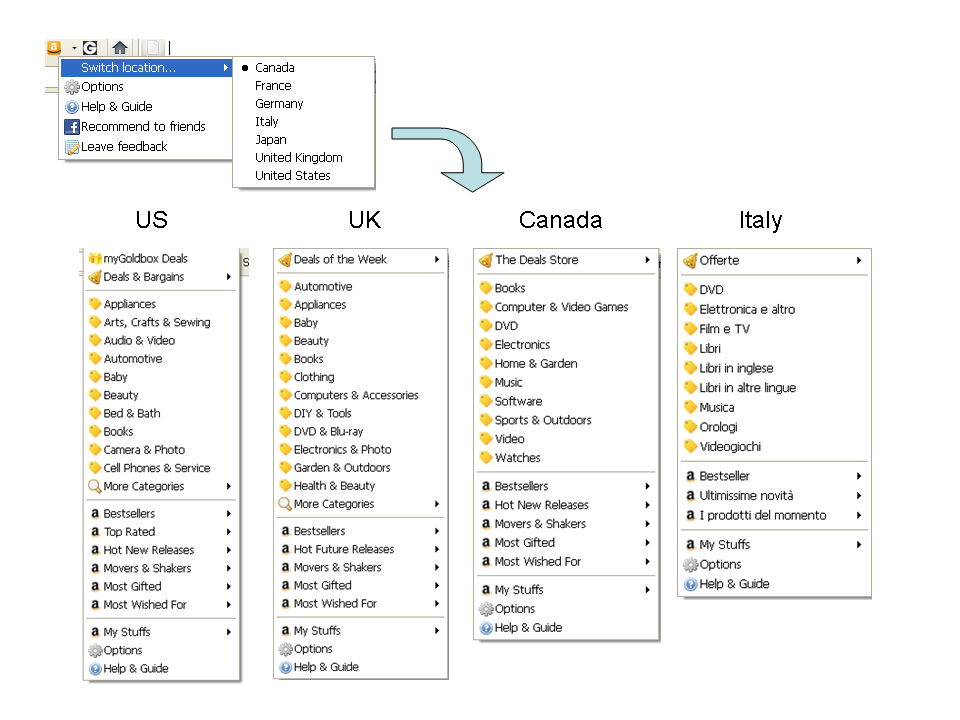
- Amazon Italy deal and discount links are now included
- Amazon US, UK, France and Germany’s deal and discount links are updated
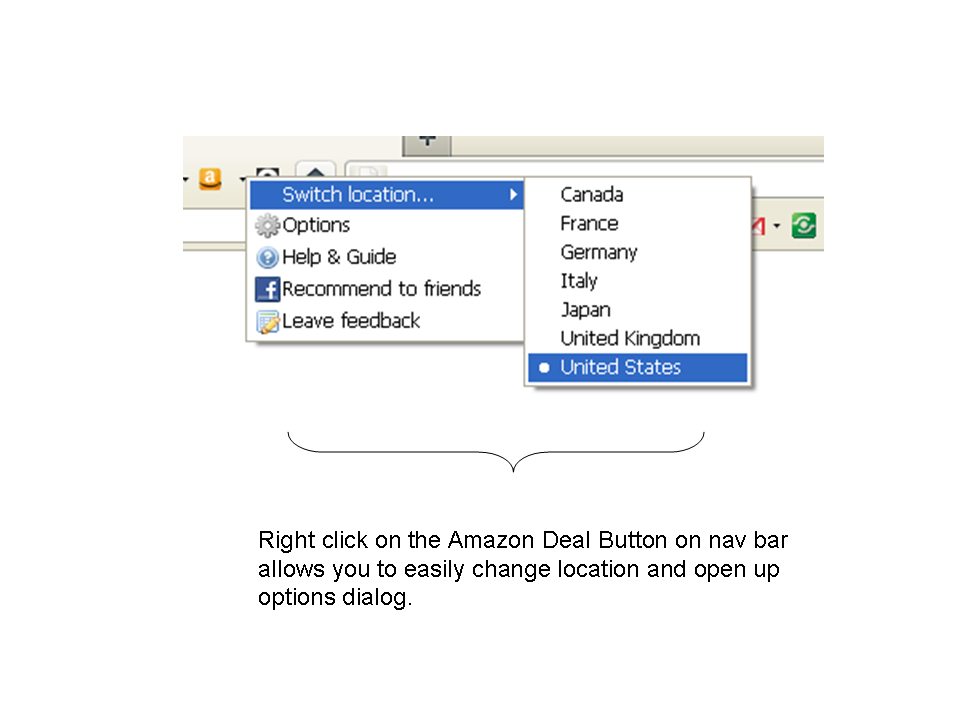
- More conveniently switch Amazon International Sites or change other options by right clicking on nav bar button and choose from the popup menu
Firefox Addon: Groupon Button version 1.0.20110331 released
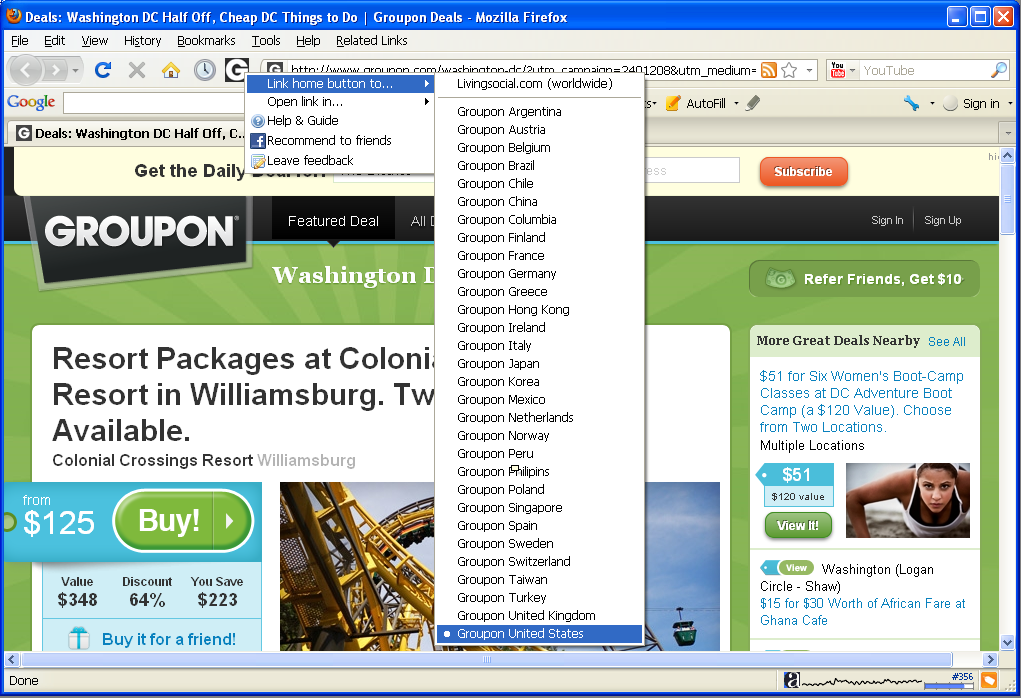
 In this version, you may choose to link the button to either LivingSocial or any of Groupon international sites, in addition, youcan now choose to open link in new or current tab. All of these features are available by right clicking on the button, and choose from popup menu, while it remains unchanged that left clicking on the button leads you to the Groupon (or LivingSocial) site conveniently.
Download Groupon Button from Firefox official addon site. Check out the full manual of this addon.
Screenshots
Firefox Add-on: Amazon Deal Button version 1.2.20110210 Released
 This is a new version release note of Amazon Deal Button. (this version will be available to download soon)
View a complete user manual of this add-on.
The change made to the latest version of Amazon Deal Button are:
- US and UK’s deal and discount links are updated.
Firefox Add-on: Groupon Button
 We just released Groupon Button for Firefox, although it’s named after Groupon, it actually supports both Groupon and LivingSocial, both are leading deal websites selling local business coupons online, serving over 180 cities worldwide by offering a hand-picked heavily discounted local deal everyday to online shoppers. This is the 1st Firefox add-on tools that brings online shopper much closer to Groupon and LivingSocial sites than before.
Features
These features are as of version 1.0.20110331 released on March 28, 2011.
Customize your button link to either Groupon or LivingSocial
Choose to link the button to either Groupon or LivingSocial by right clicking on the button and choose from the menu. The Groupon sites include United States (including Canada cities), United Kingdom, France, Germany, etc. We are not only the first Firefox add-on for Groupon, but also the add-on that covers complete list of Groupon country sites including China. For a complete list, please see screen shots below:
Unlike Groupon who use different sites for different countries, LivingSocial covers multiple countries using one site. Currently, it covers US, Canada, UK, Australia You may choose your button link to LivingSocial.com.
One click check out latest deals
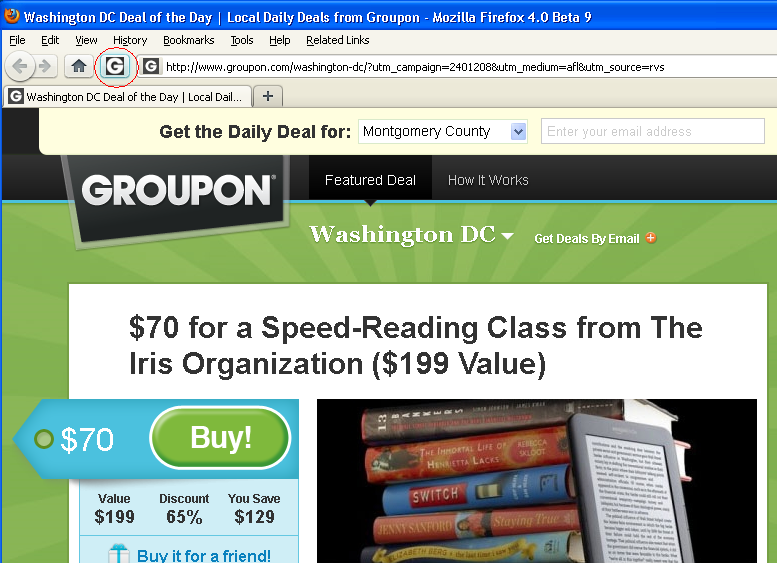
Clicking on Groupon Button on Firefox navigation bar leads you to Groupon or LivingSocial page of your customized city which shows today’s deals of your preferred local area.
Choose to open link in different locations
Right clicking on the button and choose from the “Open link in…” menu will allow you to choose to open links in a foreground new tab, a background new tab, or current tab.
Frequently Asked Questions
Why don’t you allow me to choose city?
Currently, both Groupon (all sites) and LivingSocial allows you to change your city preference on their site, that setting is automatically saved, therefore there is no need for Groupon Button to duplicate that effort. After you choose a site to link to, you don’t need to bother to choose city using this addon, all you need to do is to make sure you chose the right city on Groupon or LivingSocial site, as both Groupon and LivingSocial site has the ability to remember your setting and will redirect to your previously chosen city page when you return.
Here are the steps of choosing city preference on Groupon/LivingSocial
- Groupon: open drop down menu on the city name at top of the page, then change city.
- LivingSocial: click on “more deals” on upper left area, then choose city.